How To Put A Powerpoint In Imovie
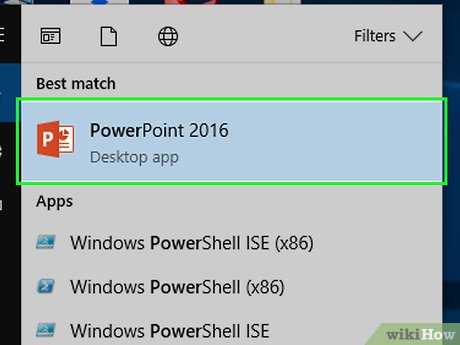
Record and document events outside of the school. Now you can insert the converted MPEG-1 video into PowerPoint and embed iMovie to PowerPoint on Mac or on PC.

Free Movie Maker Video Editing Software Video Editor Free Movies
Tell stories using pictures images and music.

How to put a powerpoint in imovie. Post directly from other apps. How to add converted WMV file into PowerPoint. Click the Insert tab.
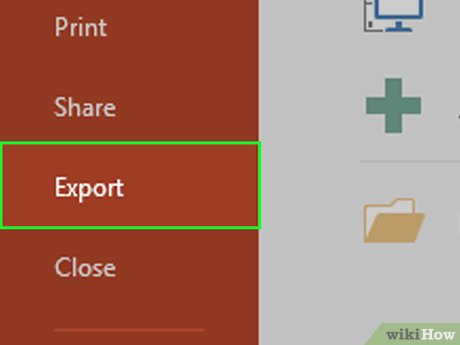
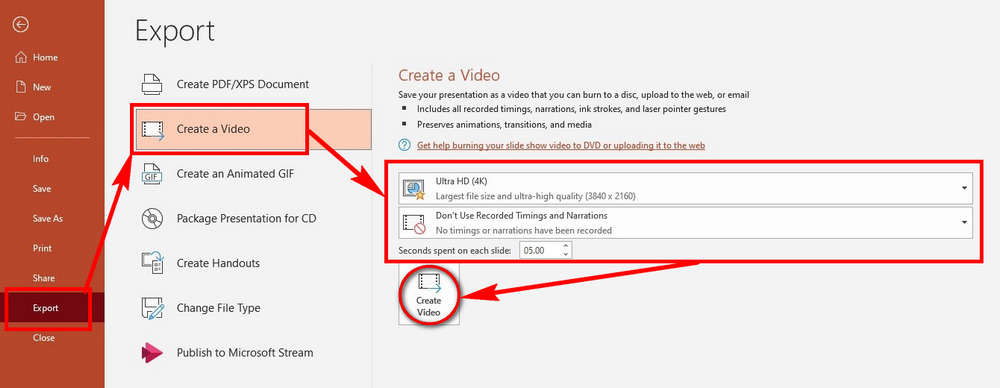
The video will now appear in the PowerPoint slide. Step 6 Insert iMovie video into PPT. Click on the Export option.
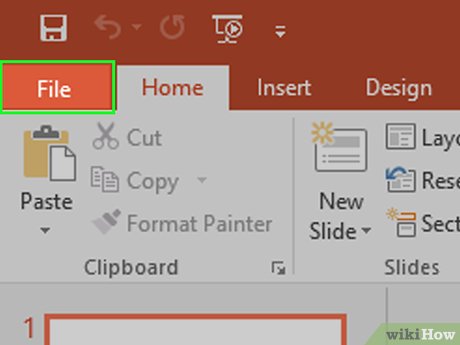
Click on the File option shown in the menu bar. Improve their communication skills. Choose Movie From File and browse to locate the video you want to insert.
Firstly open a PowerPoint presentation. Import the saved movie into iMovie-- Rich. In the Insert Video box click the file that you want to link to click the down arrow next to the Insert button and then click Link to File.
Click the Insert menu and select Movies and Sounds 3. Doing so saves the PowerPoint in QuickTime movie. Tap the green Add button.
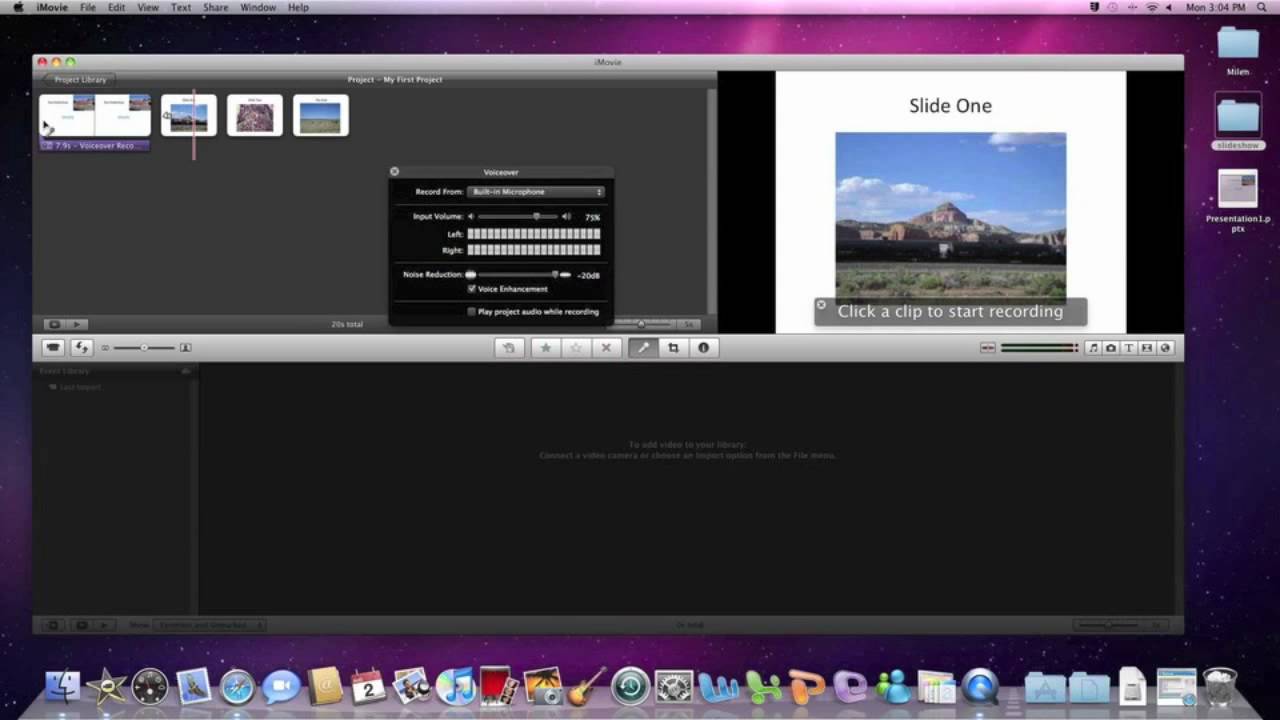
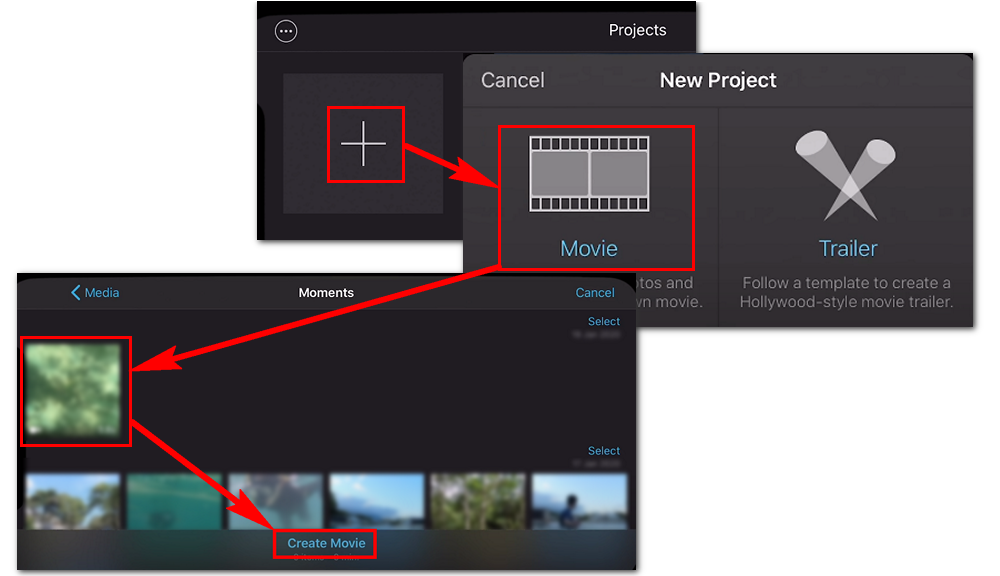
Open a new slide click on the movie icon or click Insert Movie choose your file and click Choose. Tap the green check mark to upload. This tutorial shows you how to upload a PowerPoint Presentation into iMovie edit the movieadd a voiceover recording and publish onto YouTube.
Click on Insert tab and select Movie to insert video into PowerPoint just as in PowerPoint 2003. If you are using Mac you can open the iMovie window and directly drag and drop your PowerPoint presentation video into iMovie. The drill on your PC for adding videos is now about as slick as a MAC.
Click File in the menu bar and Open. An Insert Video window appears. PowerPoint will ask if you want the video to play When Clicked or Automatically.
After that select the presentation that you want to add to iMovie. Double-click the WMV file you just saved. Create engaging presentations and projects.
Click Movie Settings and then under Media settings on the Background soundtrack pop-up menu click Select soundtrack. Create a folder which contains both your PowerPoint presentation and any embedded movies as separate files to keep the required linked relationship between both PowerPoint and multimedia files. In order to do that you can use a.
Step 1 Open a PowerPoint presentation. Click the slide in either Normal or Outline view to which you want to add a video. In older versions of PowerPoint click Save as Movie.
Add PDFs to Seesaw. On the Insert tab click the arrow under Video and then click Video on my PC. Select the item you want to upload photos videos graphics collages etc.
Open your slideshow in PowerPoint. In PowerPoint select the slide that youd insert video. First you need to convert the Powerpoint into video format The most suitable formats to insert into PowerPoint are WMV.
In the Media group click the Video icon. Then select the PowerPoint presentation you want to add to iMovieStep 2 Click File in the menu barStep 3 Click Export. With this ideal video to PowerPoint converter just enjoy inserting any kind of video into PowerPoint like inserting videos from YouTube to PowerPoint iTunes to PowerPoint iMovie to PowerPoint and more.
Students can use iMovie to. If you cannot select an audio file that plays on your computer on the Enable pop-up menu click All Files. If you are using iPhone or iPad you should first transfer the presentation video to your iPhone or iPad.
Launch PowerPoint if it is not already open go to the slide you want to embed the YouTube video to click Insert from menu bar present above the Ribbon click Video from the Media section at the right end of the Ribbon click Online Video from the list that appears in the Enter the URL for the online video field on the Online Video box paste the URL that you copied earlier and click Insert to insert YouTube video into PowerPoint. To import PowerPoint into iMovie you have two ways to go. Inserting videos into PowerPoint.
Make high quality video reports. PowerPoint 2016 and newer versions support the playback of video with multiple audio tracks. Click on the File option shown in the menu bar.
Tap the Upload button. About Press Copyright Contact us Creators Advertise Developers Terms Privacy Policy Safety How YouTube works Test new features Press Copyright Contact us Creators. You can add any project that is saved on your device Camera Roll to Seesaw.
Firstly open a PowerPoint presentation. The Video menu lets you choose a video on your hard drive or on the Internet. Go to FileSave as Movie to your desktop.
Add any annotations that you may want to add. On the File menu click Save as Movie. After that select the presentation that you want to add to iMovie.
A video on exporting a PowerPoint presentation to iMovie and adding a voice-over trackThis is quick way to utilize PowerPoint animation in your iMovie proje. Click File option from the Menu bar and then click on the Open option. Do so by double-clicking the orange app thats shaped like or contains a P.
Click File option from the Menu bar and then click on the Open option.

How To Upload A Powerpoint Presentation Into Imovie Youtube
Lights Camera Book Trailers Using Imovie Looking For An Easy Fun Way To Motivate Your Students To Read This Packe Greenscreen Book Trailer Book Trailers
How To Add A Powerpoint To Imovie
How To Add A Powerpoint To Imovie

How To Import Android Videos To Imovie For Editing Android Video Android Videos

How To Teleprompter With Keynote And Powerpoint Powerpoint Keynote Hacking Computer

Imovie Adding Text Slides And Transitions Youtube

How To Add A Powerpoint To Imovie

12 Skills To Put On A Resume For Retail Phoenix Officeaz Amazing 12 Skills To Put On A Resume For Ret Resume Skills Retail Resume Skills Job Resume Examples

Entry Level Sales Resume Best Of Sales Resume Sample Sample Resume For Sales Manager Resume Format For Freshers Resume Format Best Resume Format

Using Powerpoint In Imovie And Voice Over Youtube

How To Add A Powerpoint To Imovie
How To Make A Movie File Using Powerpoint And Imovie Youtube

Podcast How To Export Ppt Slides And Import Into Imovie Youtube

Make Movies Do You Make Movies With Your Class Green Screen Tutorial Teaching Technology Classroom Tech

Powerpoint Design Make Great Slideshows In Powerpoint Udemy 2 Coupon Udemy Coupon Code Free Discount Coupons Pro Powerpoint Design Udemy Coupon Udemy
How To Add A Powerpoint To Imovie
With Pictures How To Import A Powerpoint To Imovie
With Pictures How To Import A Powerpoint To Imovie


Posting Komentar untuk "How To Put A Powerpoint In Imovie"