How To Copy Contacts From Vivo Phone To Sim
Browse to the vcf file from your previous phone and open it. To add more name details.

How To Recover Data From Broken Vivo Phone Phone Data Data Recovery
Export iPhone contacts to SIM card.

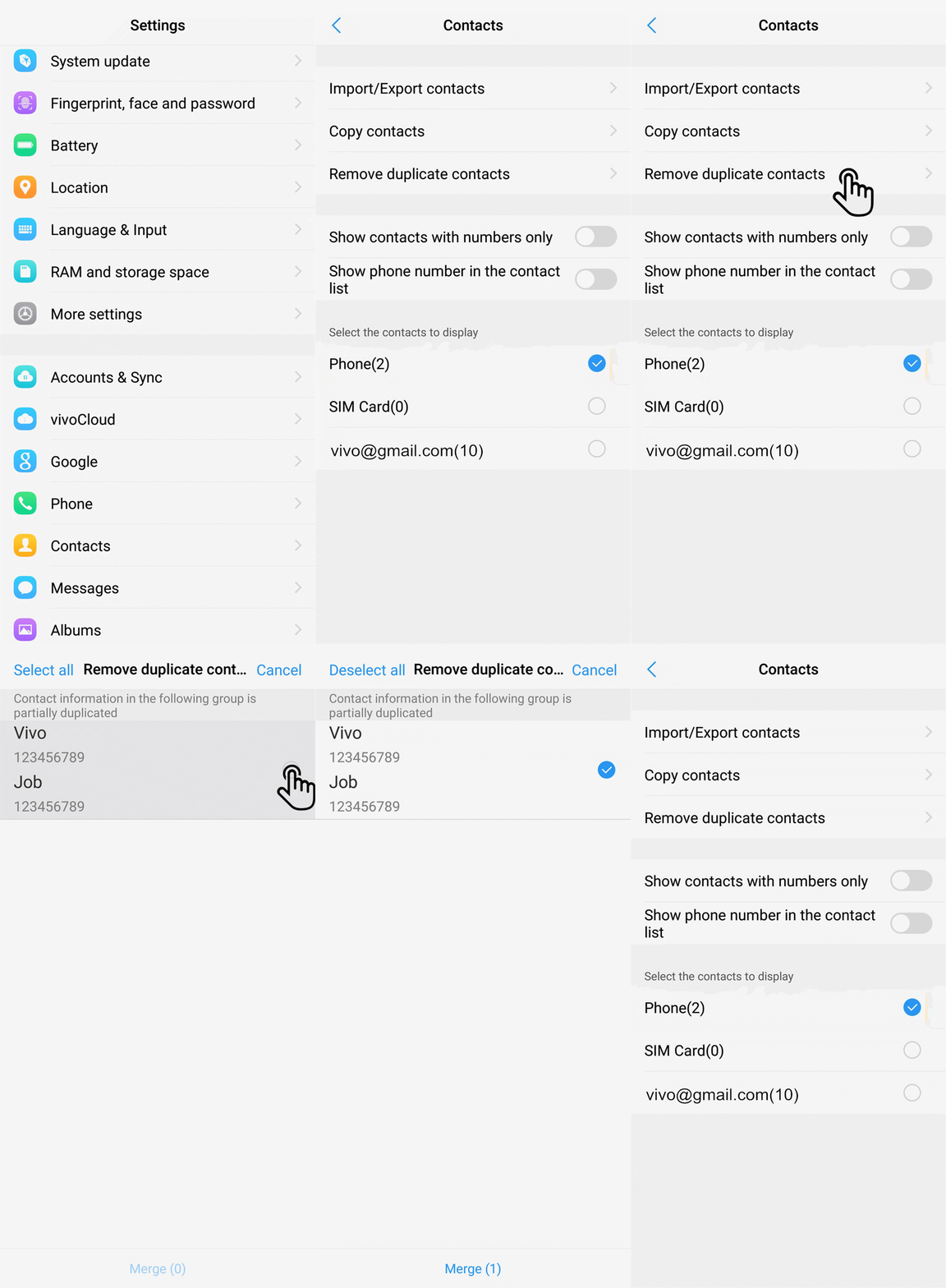
How to copy contacts from vivo phone to sim. Vivo Mobile How to Copy ImportExport Contacts in Vivo Mobile Hi everyone in this video i am going to show you that how to Copy Contacts From SIM to Phone in vivo mobiles how to copy Contacts From Phone to SIM in vivo mobiles and how to Import Export Contacts in vivo mobiles. Standart SIM Nano SIM Micro SIM. How to Export Contacts from SIM1 to SIM2 in Vivo Android Device- If you want to copy contacts from SIM1 to SIM2 card then follow these few steps.
For Funtouch OS 26 and lower version enter ContactsMenu button on the left of Home buttonCopy contactsCopy from SIM cardselect the contactsCopy and then choose Phone. How to import or export contacts stored in SIM card Last Update date. Tap ImportExport contacts Export to SIM card and confirm your selection.
On this page you will learn how to insert a SIM or micro SD card into the Vivo Y71t or remove it properly. However the complexity involved depends on the number of contacts you are copying. Welcome to vivo Support.
Enter the contacts name and an email or phone number. Answer 1 of 9. Be sure to turn off your device when you insert the card.
On buying a new phone the first thing you do is import the contacts from your old smartphone. Go to ImportExport contacts again and click on the Export to SIM card. Power Battery Heating.
Up to 50 cash back To successfully transfer your iPhone contacts to your SIM card you may need to use an Android phone. Thus now you know how to transfer contacts from Vivo to Oppo with MobileTrans. Right after you get the list of content start transferring the Contacts from Vivo to Oppo.
If your last phone was a non smartphone you can copy your contacts from the SIM card. Click Contacts app on your Vivo phone Settings or three vertical dots at the top right corner. TRANSFER CONTACT NUMBER FROM PHONE TO SIM.
Next to Name tap the Down arrow. Keep your Vivo phone on the Source and Oppo phone on the Destination. After that Vivo contacts will be saved to the SIM card.
2020 If you need to quickly transfer phone numbers from one device to another - exporting them to the storage on your SIM card is an effective way - however only phone numbers and names will be transferred to a SIM. Go back and check if contacts have been imported to the Android phone. Go to Contacts App click Import from USB storage.
To pick the account where you want to save the contact. It is suitable for the following types of SIM. Next to your email account tap the Down arrow.
Vivo Y71t - some useful info. At the bottom right tap Add. Select Export to SIM under Export Click Phone in the window Export contacts from Select wanted contacts or press Select all.
Y17 V15 Pro V15 V11 V11i Find My Phone Update. Select vcf file in the window that pops up. How to transfer contacts from SIM card to my phone.
Jump to step 9 in this guide if you want to copy your contacts from the SIM card. Below we will discuss the best methods you can use to copy several contacts multiple contacts and even all the contacts from iPhone to SIM. Vivo V9 is one of the latest entries in the smartphone market and if.
Please go to SettingsContactsCopy contactsCopy from SIM cardAllCopy and then choose Phone. Connect your Android phone to the computer. On your Android phone or tablet open the Contacts app.
After the transfer process is over all phone contacts will be on the SIM. Tap Import on the Settings screen. How do I export contacts from Vivo.
Why is the SIM toolkit gray on my phone. This guide will show you how to retrieve your contacts from your Google account if your last phone was a smartphone. How to Export Contacts from SIM to Phone in Vivo Android Device- If you want to copy contacts from SIM card to Phone then follow these few steps.
How to Export Contacts from Phone to SIM in Vivo Device- If you want to copy contacts from phone to SIM card then follow these few steps. Can I transfer the messages stored on the phone to the SIM card. Download vCards shared via email on an Android phone.
You can Flip in case of wrong order selection. Can I remove or insert SIM and SD card when my phone is on. Your contacts will import to your new phone and you can start calling and messaging your favorite people.
Vivo Insert SIM or SD 30-10-2021. Vivo vivomobiles vivocontacts vivocontactssettings Queries. How to transfer contacts from SIM card to my phone.
Where can I find the SIM card Toolkit.

Check Out This Behance Project Real Me 2 Pro Advertisement Https Www Behance Net Gallery 71428239 Real Me 2 Pro Advertisement Oppo Mobile Pro Advertising
Import Contacts Vivo Y30 Android 10 Device Guides
Import Contacts Vivo Y30 Android 10 Device Guides


Vivo Y12 Specs Price Penyimpanan

How To Copy Contacts From Sim To Gmail On Vivo Youtube

Recover Deleted Or Lost Files From Vivo Y53 Y55 Y66 Y67 Data Recovery Tools Data Backup Data Loss

How To Backup And Restore Vivo X7 X7 Plus Vivo Backup Android Backup

Zero Down Payment Offer In 2021 Mobile Gadgets Mobile Electronic Items

How To Copy Contacts In Blu Vivo One Plus 2019 Transfer Contacts To Sim Youtube
Vivo Global

Oppo A5s Tips Tricks How To Show Contact S Profile Picture On Oppo M Profile Picture Profile Oppo Mobile

Pin By Maria Malik On Smart Mobile Phone Usb Radio Vivo Latest Smartphones

Pin On Cellphone Tutorials Technology

How To Turn Off Talkback Mode On Vivo Mobile Phone Vivo Tips Tricks Mobile Phone Vivo Phone

Pin On Tech

Pin On Windows Computer

Micromax X741 Dual Sim Mobile Buy Feature Mobile Phone Dual Sim Feature Phone Memory Storage

Xifo Ismart I1 Price 3 990 4g Volte 5 95 Inch Display 4g Smartphone Buymobile Smartphone Androidphone Mobile Smartphone Buy Mobile Android Phone

How To Transfer Photo From Iphone To Android Iphone Samsung Galaxy S4 Homescreen


Posting Komentar untuk "How To Copy Contacts From Vivo Phone To Sim"