Remove Duplicate And Original In Excel
To follow using our example download Find Duplicatesxlsx. First select the Unique record only check box.
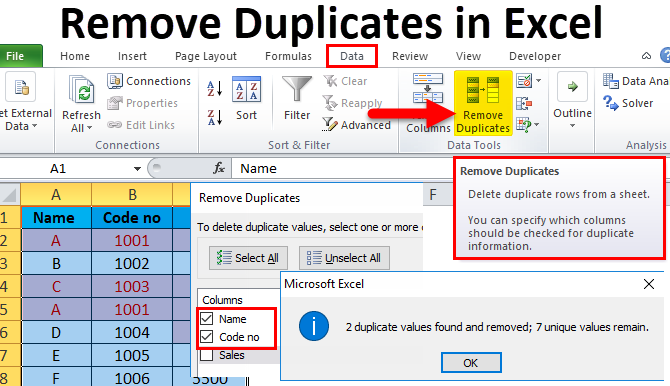
Remove Duplicates In Excel Methods Examples How To Remove
Remove all duplicates but keep one.

Remove duplicate and original in excel. Active 4 years. Open a new or an existing Microsoft Excel document. Im working with a large excel database and need to delete not only the duplicate record but also the original one-- if that makes sense.
Excel get sum based on a unique value in two categories. Click the Data tab on the Ribbon and then click on the Remove Duplicates button in the Data Tools section. Clicking the OK button populates a list of unique values in the target location.
I have two lists of Client Accounts. To remove duplicate values click Data Data Tools Remove Duplicates. One with 45000 rows and the other is 45800 rows.
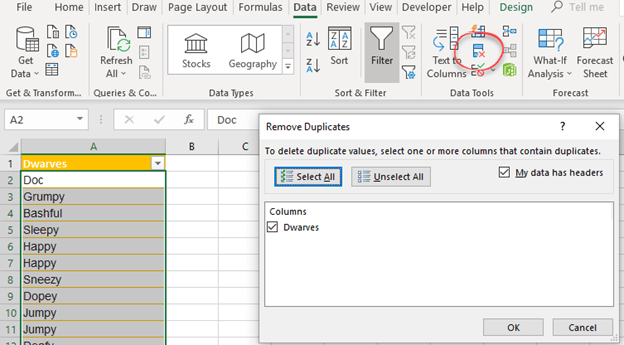
Click Data Remove Duplicates and then Under Columns check or uncheck the columns where you want to remove the duplicates. On the Data tab click Remove Duplicates to open the Remove Duplicates dialog box. I only want that 800 unique accounts from Column B.
Click Insert Module and paste below VBA to the new Module window. You will learn a few different techniques to find and delete duplicate values with or without first occurrences get rid of duplicate rows detect absolute duplicates and partial matches. Thats OK for most situations.
DATA tab Data Tools section Remove Duplicates. Next locate the Remove Duplicates option and select it. To remove them completely select Copy to another location option and select a cell for the Copy to range field.
In this case itll remove the extra rows for Happy and Jumpy leaving just one row for each. Click on any cell with data in your worksheet. Lets see how to delete duplicates excel using advanced filter.
Ive merged two databases together--one thats a master list of names and contact info and the second with names of people who have already been contacted. Removing duplicate values in data is a very common task. Select a cell inside the data which you want to remove duplicates from and go to the Data tab and click on the Remove Duplicates command.
If you click on a single cell Excel automatically determines the range for you in the next step. ISERRORVLOOKUPA2cleansed1false Filter for true - any true cells do not appear in your cleansed list and must have been deleted. There are couple of options to go through.
Ask Question Asked 4 years 3 months ago. How to remove duplicates and originals in excel. Open a new or an existing Microsoft Excel document.
In this option we can either overwrite the existing data or we can choose to location where the data will get populated. Then select cell B1 and drag the fill handle down to the cells that you want to. All of the 45000 in Column A is in the 45800 in Column B.
First click on any cell or a specific range in the dataset from which you want to remove duplicates. Select the entire data of table. Always start by creating a copy of your worksheet before you begin working so your original data remains safe.
How to Find and Remove Duplicates in Microsoft Excel. A Remove Duplicates dialog box will appear on the Excel document. After removing all duplicates I got rid of duplicates in first 4 rows.
Remove Duplicates is tucked away on the Data tab Data Tools Remove Duplicates. Remove both duplicate rows in Excel with helper column. Excel 2016 delete duplicate.
So when I put the two together for instance a record. Click the Data tab on the Ribbon and then click on the Remove Duplicates button in. So I unchecked January in the Remove Duplicates box.
Now you can use formulas with unique values to consolidate data from your data set. Go to data click Advance under Filter you will get the below option. Lets say that your ID is in the A column in both lists.
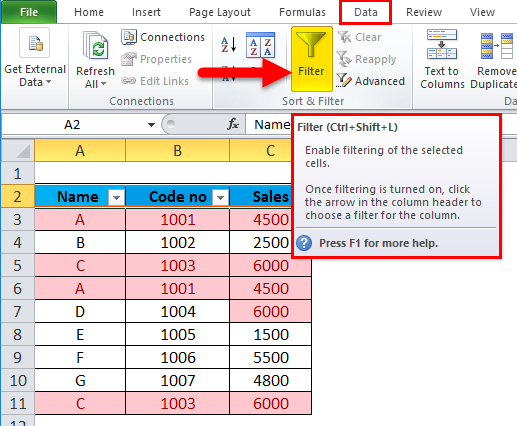
If you are interested in VBA here I also can introduce a VBA code to solve this task. In your original list search for the unique identifier in the cleansed list. To filter for unique values click Data Sort Filter Advanced.
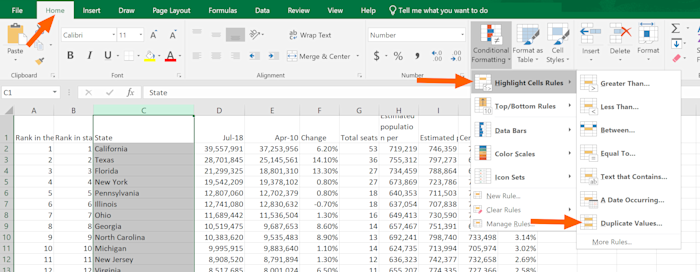
To highlight unique or duplicate values use the Conditional Formatting command in the Style group on the Home tab. The video offers a short tutorial on how to delete duplicate values along with respective original values in Excel. Its so common theres a dedicated command to do it in the ribbon.
In your original list use this formula. In this video we will learn How to remove duplicate data from sheet in MS Excel in a very easy way. Press Alt F11 keys simultaneously to open Microsoft Visual Basic for Applications window.
In Action you have 2 option. Second easiest way to remove duplicate list. Remove all duplicates but keep only one with VBA.
Remove Duplicate And Original - Excel. In Excel there are several ways to filter for unique valuesor remove duplicate values. The tutorial explains how to remove duplicates in Excel 2019 Excel 2016 Excel 2013 and Excel 2010.
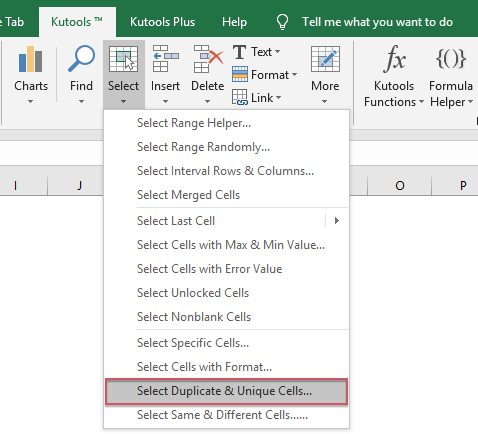
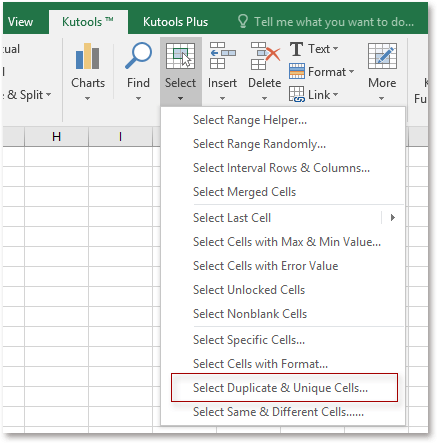
A list of Steps to Remove duplicates from Excel document is discussed below -. In the Select Duplicate Unique Cells dialog box choose All duplicates Including 1 st one under the Rule section then click Ok OK to close the dialogs and all the duplicates have been selected at once you can press Delete key to remove them see screenshots. Remove Duplicate And Original.
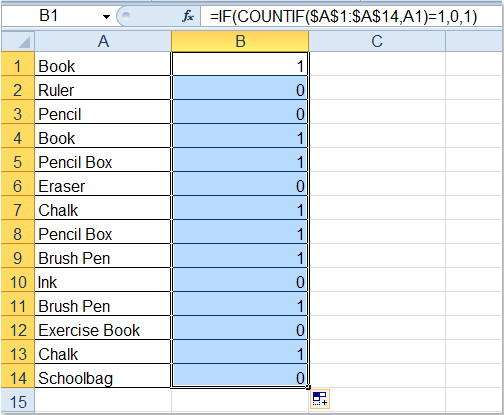
Filter the list in-place will just. The Advanced Filter dialog box will appear. IF COUNTIF A1A14A1101 into a blank cell besides your data B1 for example and then press Enter key.
Hopefully you will learn new things from this videoWhat. Go to Data tab. It will ensure that an Excel listtable has only unique values for the column selected.
But I cannot get rid of originals. For example in this worksheet the January column has price information I want to keep.
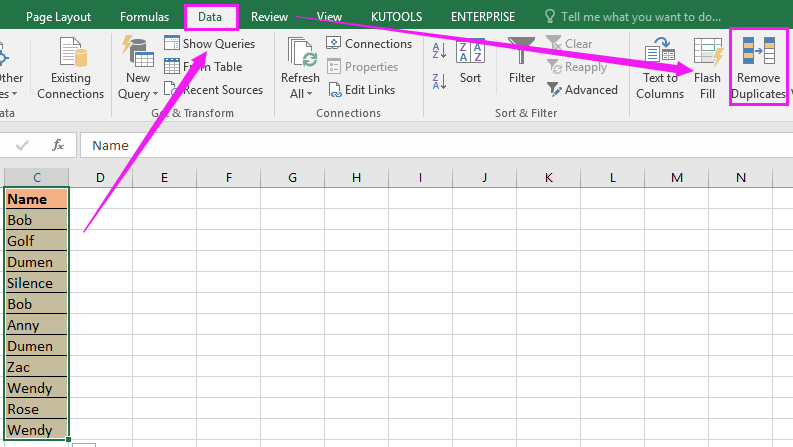
How To Remove All Duplicates But Keep Only One In Excel

Highlight Duplicate Cells In Excel 2007 Excel Microsoft Office Hacking Computer
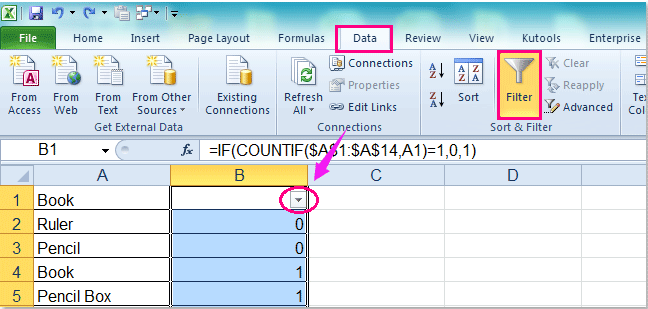
How To Remove Both Duplicate Rows In Excel
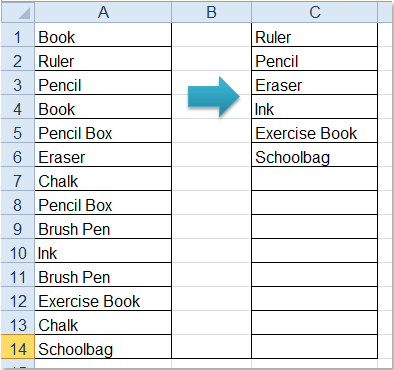
How To Remove Both Duplicate Rows In Excel
How To Find And Remove Duplicates In Excel
Remove Duplicates In Excel Methods Examples How To Remove

Data Consolidation If You Chose To Link To The Source Data Then Each Cell Will Contain A Formula Linking Back To The Original Data Data Excel Consolidation
How To Remove Both Duplicate Rows In Excel

Group Data In An Excel Pivottable Pivot Table Excel Data

Whether You Want To Sort Url Or Email Lists Remove Duplicated Elements Split Merge And Substract Unsubscribed Lists O Software Everything Is Possible Info
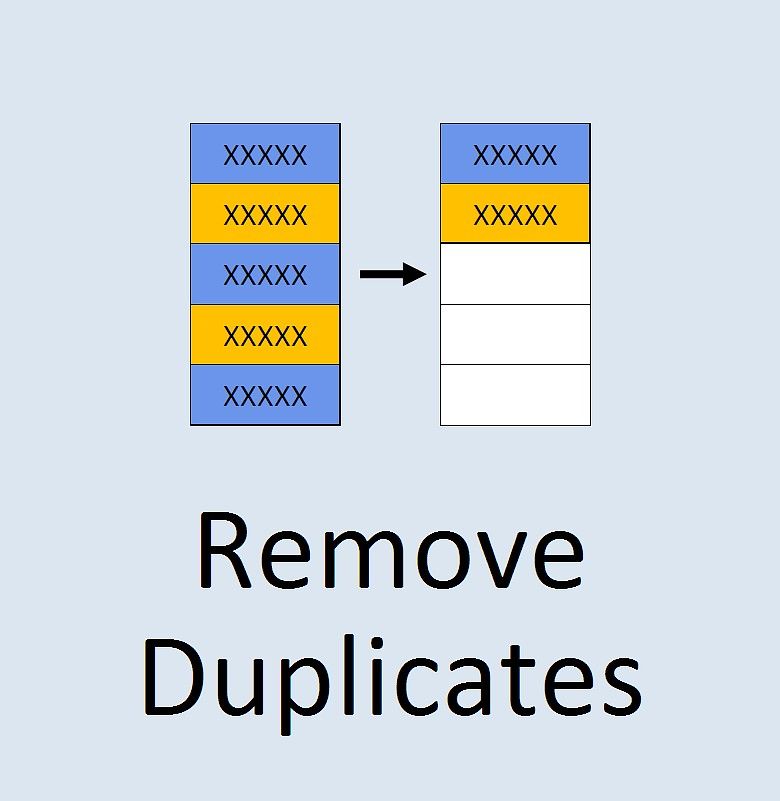
How To Remove Duplicates In Excel Delete Duplicate Rows With A Few Clicks

How To Remove Both Duplicate Rows In Excel

How To Remove Duplicate Rows In Excel
Excel How To Remove Both Items If A Duplicate Office Watch
Pivot Table To Create List Of Unique Items Remove Duplicates In 2021 Computer Help Excel Windows Programs

How To Remove Duplicate Rows In Excel

Create And Name A New Worksheet Excel Zoom Excel Worksheets Excel Macros
How To Remove Both Duplicate Rows In Excel
How To Remove All Duplicates But Keep Only One In Excel


Posting Komentar untuk "Remove Duplicate And Original In Excel"