How To Delete Multiple Estimates In Quickbooks
Click the Run icon. From the New menu select Invoice.
Can I Delete All Of My Invoices At Once
Click on Sales Estimates in the menu at the left of your screen.

How to delete multiple estimates in quickbooks. Choose the All Sales button. You can easily delete multiple items in QuickBooks without impacting on other accounts through Dancing Numbers Deleter tool. You can undo transactions by clicking either the Clear or Revert buttons in QuickBooks.
Delete a Single Customer from QuickBooks Online. From there youll be able to look through your entire estimate Convert to. Use the Filter button andor other sorting options if necessary.
Click on the drop-down named Filter. Click Skip and send message. Click the Delete option on the upper left.
Click the Gear icon. You can delete multiple Quickbooks Online in bulk by using SaasAnt Transactions Online. Press the Clear button to delete any information you added in a new transaction that you havent yet saved in one of the customer employee or vendor centers.
You click the New button in the upper left and select Estimate. From here select the invoices you want to Print. When the form opens youll notice one difference right away.
To unattach the document and permanently delete the file simply click the checkbox for. Once done we can combine the estimates into one invoice. Enter your requestproduct suggestion then click Next.
Or click Revert to undo all changes made since the previous save. Not making an inactive estimate to active. The app resolves the issue about how to delete multiple transactions in QuickBooks.
A new window will appear to select the printer name. When a customer gives approval what you should be doing is converting the estimate to an invoice. It is one of the efficient tools which are beneficial for removing unwanted content from the accounting software.
Open the Estimate right-click anywhere on the screen. Creating an estimate in QuickBooks Online is like creating an invoice with a few differences. The very first open QuickBooks and then select Company menu Next click on the option named Make General Journal Entries After that go to the Main tab.
Enter Estimates by Customer. This will bring on the selected invoices to the vendor. But with Bulk Deleter you will spend only several seconds.
After clicking on Edit click on Delete customer Jobs. In order to convert estimates to invoices you might have to turn on a setting in your configuration. The process of creating an estimate in QuickBooks Online is almost identical to creating an invoice.
To learn how to view edit or delete an Estimate follow these step-by-step instructions. Go to the Customers menu. Then Click the OK button.
Thats all for today. Now you are ready to convert an estimate into an invoice. Ill guide you how.
Double-click on the estimates you want to delete. When you go to preferencesSend FormsCompany Preferences QuickBooks provides you with email templates for multiple different forms including Invoices Estimates Sales Receipts etc. Steps for How to Delete Multiple Entries in QuickBooks.
You can delete multiple transactions in Quickbooks Online as bulk using SaasAnt Transactions Online. Locate and click on the one that needs to be removed. Experienced accountants know that not all accounting information has to be stored for years and when the time comes to delete these transactions in bulk the issue becomes really time-consuming headache.
In the navigation bar on the left go to Sales then open your All Sales tab. To deselect the invoices remove the check mark mentioned in the left and to select the invoices check the box appearing in the left. Click on Save and New to create the other estimate.
Select Save Close once done. In this step click on customer centre and then click on Customers and Jobs. Also if you choose to duplicate an estimate in QuickBooks Desktop Pro be careful when you select the Duplicate Estimate command from the Menu Bar as it is located right next to the Delete Estimate command in the drop-down menu.
Select the name of your client. QuickBooks permits the import of estimate show as closed status in QuickBooks Online. By Using SaasAnt Transactions you can delete upto 3000 transactions in a single click.
Marking an estimate as closed. In the drop-down which says Type choose the Estimates option. Select the name of your client.
First open QuickBooks Online and go to the customers. How to remove an estimate. Select the Customer Center.
In this window youll have the option to simply unattach the document but keep the document stored on the Attached Documents servers or to unattach the document and remove the document from Intuits servers at the same time. Find the estimate you want to view and click the arrow button to the right of that EstimateSelect View from the drop-down menuAn Estimate screen will open up. Now to access the previous window click on the left arrow at the top of the General Journal Entries window.
Google quickbooksestimatetoinvoice for step-by-step instructions. Upon clicking the Delete button youll see the Delete Attachment window. Locate the estimates in the pop-window then click Add.
Choose the Transactions tab. Select Reports from the top menu bar. Now select the customers that you wish to delete and click on Edit.
Can I batch delete a bunch of estmates for a customer. There is an email template for Overdue Invoices and even one for Almost Overdue Invoices. Enter the necessary details.
Select Feedback as the Category.

Change Invoice Template Quickbooks Quickbooks Invoice Template Book Report Templates
How Do I Delete Multiple Invoices At The Same Time With Online Quickbooks Pro

Solved I Want To Delete Vendors That Haven T Been Used In

Solved How To Delete Invoice Templates In Qb Desktop 2020

How Do I Delete Everything In My Quickbooks And Start Over


Void A Check In Quickbooks Desktop Pro Instructions And Video Lesson How To Memorize Things Quickbooks Video Lessons
How Do I Delete Everything In My Quickbooks And Start Over

Solved How Do I Completely Delete A Company File From Desktop Version

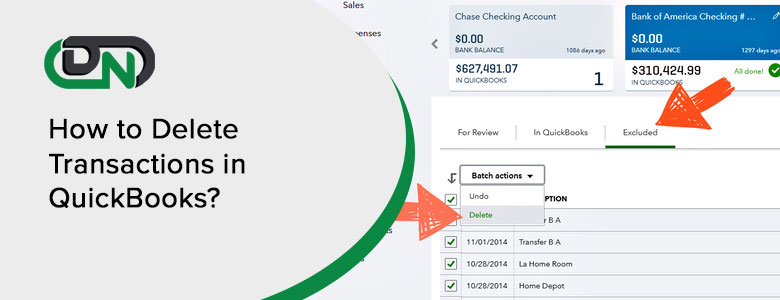
How To Delete Transactions In Quickbooks Dancingnumbers
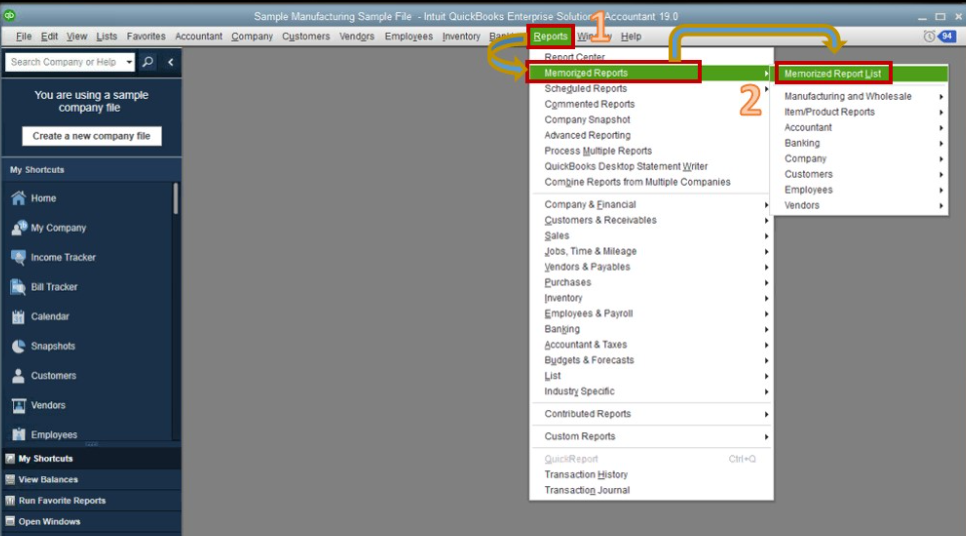
How To Create And Delete Memorized Reports In Quickbooks
Can I Delete All Of My Invoices At Once

How Can I Delete Multiple Transactions That Are Already In The Register Not Excluding Transactions Before They Get Added To The Register

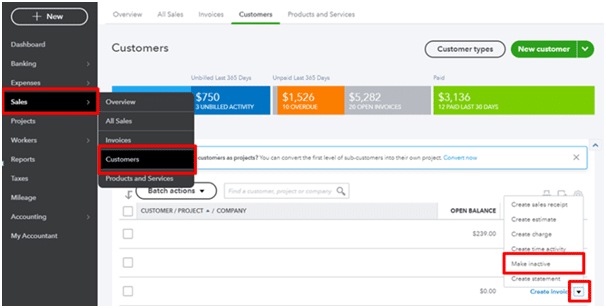
How To Delete Multiple Customers In Quickbooks Single Customer
Solved How To Delete Invoice Templates In Qb Desktop 2020

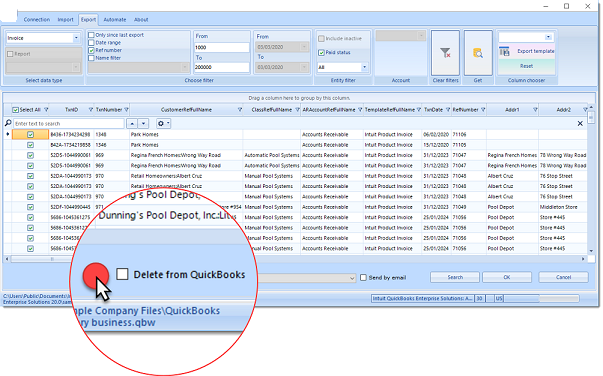
How To Delete Quickbooks Online Data And Start From Scratch

How To Customize Invoice Templates In Quickbooks Pro Merchant Maverick With Regard To Quickbooks Invoice T Invoice Template Quickbooks Online Business Template

Solved Deactivate Multiple Estimates At Once

Duplicate An Estimate In Quickbooks Desktop Pro Instructions Quickbooks Quickbooks Tutorial Instruction

How To Remove An Estimate


Posting Komentar untuk "How To Delete Multiple Estimates In Quickbooks"