How To Install Google Analytics On Godaddy Website
Next PushEngage lets you add UTM parameters to track visitors from web push notifications in Google Analytics. Find the global site tag for your property and copy the code exactly without editing it.
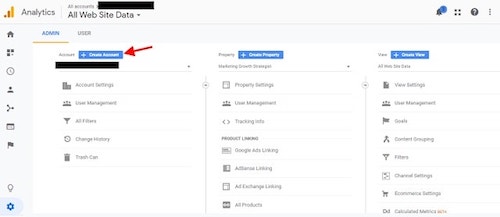
How To Use Google Analytics To Increase Website Traffic Godaddy Blog
As such these funnels can be seen within your Google Analytics account.

How to install google analytics on godaddy website. Once you set up your free account create a new analytics tracking property. The second is to manually add your Google Analytics tracking ID. Your changes are saved automatically.
You cant edit the headers or the footers to insert the code snippet. This will allow you to install your Google Analytics UA code using the settings on Monster insights. Copy the code that is provided.
Google Analytics for WordPress by MonsterInsights. Copy your your Tracking ID code from your other tab and paste it. Set up account properties and reporting views.
Copy your your Tracking ID code from your other tab and paste it here into the Tracking ID area. Having trouble installing Google Analytics to your GoDaddy website. I demonstrate this simple process so you can have Google Analytics runni.
Scroll to Websites Marketing and select Manage next to your website to open your site. Grant permissions and take care of user management. First I would install a plug-in called Google Analytics for WordPress by MonsterInsights See.
The first is to authenticate your account by signing in. Managed WooCommerce sends your all events for the Shopping Behavior Analysis and Checkout Behavior Analysis reports. Access your Google Analytics account and copy your tracking code snippit.
On the next screen click Sign up for your website. Set up goals to identify the actions you want users to take on your site. Use the links in your website builder to sign up for Google Analytics or if you need help finding your Tracking ID.
I feel your pain. The Shopping Behavior analysis report is automatically generated from the events Managed WordPress Ecommerce sends to Google. Click Click to Get Google Code.
Scroll to Website Builder and select Manage next to your website to open your site. Add Google Analytics to my site Go to your GoDaddy product page. Sign up for Google Analytics.
There are two ways to do this. Copy your your Tracking ID code from your. You cant add google tag manager to the WebsiteMarketing product.
But that only gets you so far. You can add your google analytics tracking number and track that. Go to your GoDaddy product page.
Setting up Google Analytics is straightforward. Installing Google Analytics. Access your WordPress files via hosting or FTP.
Return to the browser window with your Insights settings and paste the code where it says Paste Google Code Here. Setting up Google Analytics is straightforward. Select the Google Analytics profile you want to use.
Select Edit Website or Edit Site to open your website builder. Scroll to Website Builder and select Manage next to your website to open your site. Include the analyticstrackingphp file on each PHP template page.
If necessary login to your Google account when prompted. In the Select Audience section you can select subscribers based on. The first thing you need to do is connect your Google Analytics account to the plugin.
Paste your global site tag into a file named analyticstrackingphp. Link your Google Ads account to your Google Analytics account. Select Edit Website or Edit Site to open your website builder.
For each template page immediately after the. CPanel Plesk Managed WordPress Navigate to the wp-contentthemes folder for your WordPress site. It also allows you to choose an audience to send notifications.
Open the folder for the theme you. Next choose your account name and website name and add the URL of your website. Go to your GoDaddy product page.
Select Edit Website or Edit Site to open your website builder. Next were going to set up a new account for a website. Choose your account name and website name and add the URL of your website.
Add the Google Analytics tracking code to your website. You can either manually enter your UA number or link to your Google Analytics account if your are logged into your analytics account. Seamless integration between Google Analytics and WooCommerce makes this a relatively easy job.
Copy your your Tracking ID code from your other tab and paste it. Select Edit Website or Edit Site to open your website builder.

How To Add Google Analytics To Godaddy

How To Add Google Analytics To Godaddy

Google Analytics Wordpress Par Install Kaise Kare Google Analytics To Wordpress Google Analytics Dashboard Analytics Dashboard Google Analytics

How To Add Google Analytics To Godaddy

Howto Install Google Analytics On Wordpress Blog Social Media Measurement Web Analytics Google Analytics

How To Add Google Analytics To Godaddy
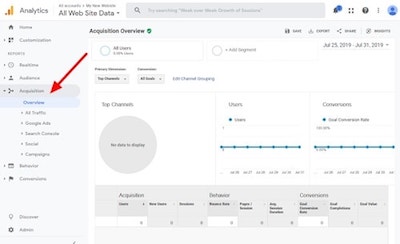
What Is Website Analytics And How Can It Help Your Business Grow Godaddy Blog
How To Install Google Analytics On Godaddy Website

How To Add Google Analytics To Godaddy

How To Add Google Analytics To Godaddy

How To Use Google Analytics To Increase Website Traffic Godaddy Blog
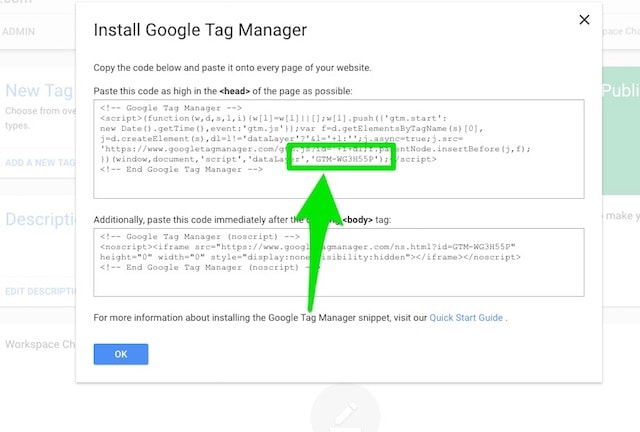
How To Add Google Analytics To Wordpress Godaddy Blog

Pin By Pctipspro Com On Complete Website Development Guide In 2021 Website Development Allianz Logo Cpanel

How To Add Google Analytics To Godaddy Youtube

How Do I Install The Matomo Tracking Code On My Godaddy Website Builder Pages Faq Analytics Platform Matomo

How To Install Visitor Analytics On Godaddy Visitor Analytics
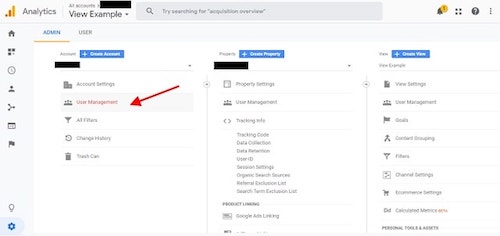
How To Use Google Analytics To Increase Website Traffic Godaddy Blog

How To Add Google Analytics To Godaddy
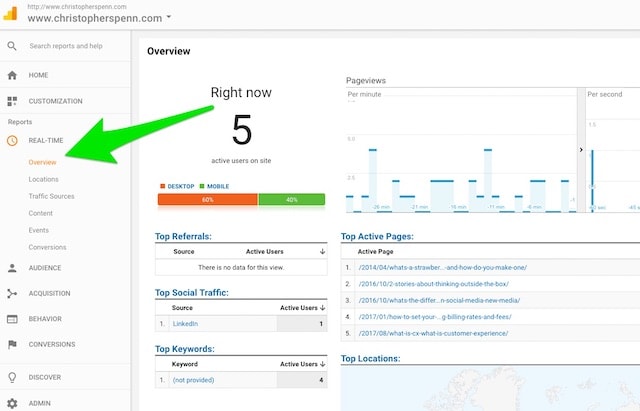
How To Add Google Analytics To Wordpress Godaddy Blog


Posting Komentar untuk "How To Install Google Analytics On Godaddy Website"