3d Cell Reference Excel 2016
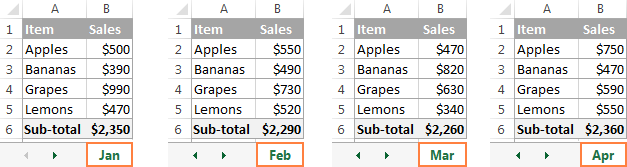
January sales are in cell B3 for each product We have a summary sheet named All_Products that will sum all the January sales for each of the 3 sheets and place the result in cell B3 of the summary sheet. I want to create the link and then be able to copy the link so that the cell reference changes appropriately.

Detailed Financial Projections Template Free Download Excel Google Sheets And Libreoffice Calc Excel Cheat Sheet Excel Hacks Excel Shortcuts
Names can be up to 255 characters in length.
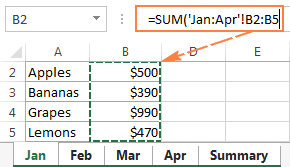
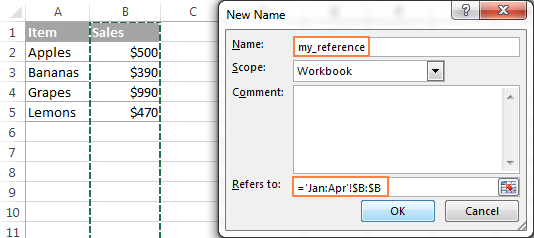
3d cell reference excel 2016. In the New Name dialog box in the Name box type the name you want to use for your reference. What are 3D References. Where a cell reference might be B3 Column B Row 3 in this worksheet a 3D reference would be Sheet 2B3 cell B3 in Sheet 2.
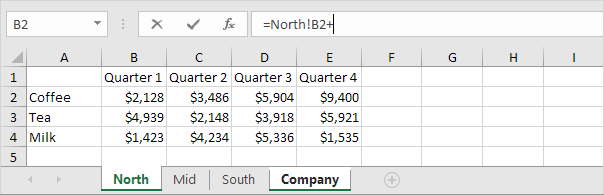
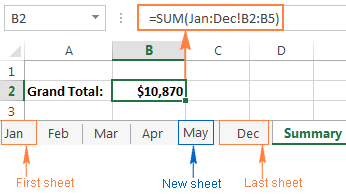
The formula using values cell references operators and functions. Go to the SUMMARY Sheet and open the SUM formula in cell B2. Type the equal sign enter the functions name and type an opening parenthesis eg.
Click the tab of the first worksheet that you want to include in a 3D reference. Type the function you want to use followed by a left bracket. Notice that Excel doesnt care about the names of the sheets when you build a 3D reference.
EDate Files Antarcticaaaaascantestxxxxxxjpg where xxxxxx is the data in a cell say h3. 3D Reference in Excel allows users to choose the same cell from different and multiple worksheets. Relative Absolute Mixed with the Column Locked or Mixed with the Row Locked.
Click a cell where you want to enter a formula. Considering this how do you write a formula using an external cell reference. If you have multiple sheets to add together a 3D reference inserted into a normal function can simplify your calculation significantly.
SUM Click the tab of the first worksheet that you want to include in a 3D. The data for each months sales is in the same cell locations from sheet to sheet ie. I would like to create a hyperlink that includes the data in a cell in the current sheet.
For instance if we have data in cell A2 and want to use that in cell A1 use A2 in cell A1 and this will copy the A2 value in A1. Select a cell you need to format as 3D button then specify a main shade color to it as below screenshot shown. SOUTH sheet and select the cell B2.
In order to use reference in excel we can choose the same cell or range of cells from different sheets just by selecting the name of the worksheet. Change a cell reference to another cell reference. Create a 3-D Cell Reference.
Start the formula normally. Type the cell reference for example B5 in the formula or click the cell you want to reference. Now go to the first sheet of 4 different region sheets ie.
Type or select the cell or cell range you want to use in the function. Select the cell where you want to enter the function and click the Insert Function button next to the formula bar. For example we have 3 worksheets with different number values and the name of the worksheets are First Second and Third.
Microsoft Excel Create a 3D Reference Across Worksheets. While holding the Shift key click the tab of the last worksheet to be included in your 3D reference. Click to see full answer.
Create a name for a 3-D reference. Read more means referring data to other worksheets and making calculations or building reports in another worksheet. Press the Ctrl 1 keys simultaneously to open the Format Cells dialog box and then go to the Border tab.
After creating a template sheet follow the below steps to create 3D references or formulas in excel. Type an equal sign to begin the formula. 19 rows Select the cell or range of cells that you want to reference.
Click the tab for the worksheet to be referenced. Now hold the Shift key down and click the last sheet Week5. Select the cell or range of cells to be referenced.
Select the cell or range of cells that you want to calculate. Then click the first sheet Week1. To make a formula with a 3D reference perform the following steps.
On the Formulas tab in the Defined Names group click Define Name. Excel 3D reference to calculate multiple sheets. Complete the formula and then press ENTER.
Excel builds the 3D reference. They can also refer to the same cell or range on multiple worksheets. Colon and then the last worksheet name in the range.
Type the rest of the formula as usual. If the name of the other worksheet contains nonalphabetical characters you must enclose the name or the path within single quotation marks. 3D References are cell references sets of coordinates that point to another cell or range of cells in a different worksheet or even workbook.
Demonstration of how to create a 3-D Reference in Microsoft Excel 2016. In excel 3d cell referencing Cell Referencing Cell reference in excel is referring the other cells to a cell to use its values or properties. In Excel 2019 Excel 2016 Excel 2013 and Excel 2010 click File Options.
This will allow you to inc. Creating a dynamic cell reference in Excel INDIRECT function Excel. How to reference another sheet or workbook in Excel.
Type the first worksheet name followed by a. 1 When we copy a formula that contains cell references we need to consider whether we need. Click the cell where you want to enter your 3D formula.
To complete the formula click D6 and press Enter. Reference a Cell in a Formula. 6 Workbook Cell Reference 7 3D cell reference 8 Defined Name 9 Table Formula Nomenclature Structured References Copying formulas with Cell References.

The Excel Xp Window Microsoft Excel Tutorial Computer Basics Excel

11 Important Microsoft Excel Spreadsheet Skills Formulas And Functions That You Should Know Plus How To Videos Tha Excel Tutorials Excel Excel Spreadsheets
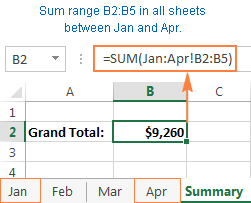
Excel 3d Reference Refer To The Same Cell Or Range In Multiple Worksheets Ablebits Com
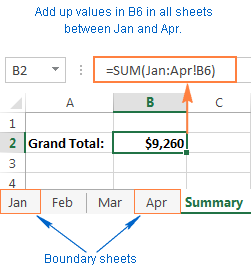
Excel 3d Reference Refer To The Same Cell Or Range In Multiple Worksheets Ablebits Com
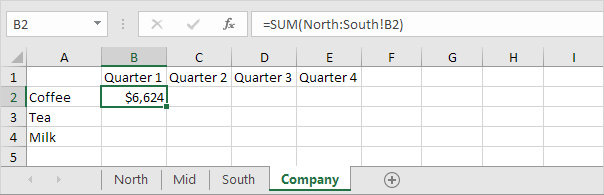
3d Reference In Excel In Easy Steps

Excel If Statement How To Use Excel Microsoft Excel Data Analytics

Moving Average In Excel Calculate With Formulas And Display In Charts Moving Average Excel Moving

How To Change The Row Color Based On A Cell S Value In Excel Excel Tutorials Excel Shortcuts Excel Formula
Excel 3d Reference Refer To The Same Cell Or Range In Multiple Worksheets Ablebits Com
3d Reference In Excel In Easy Steps

How To Create Stock Control System In Excel Using Vba Full Tutorial Youtube Excel Spreadsheets Business Intelligence Microsoft Excel

Save Time And Add A Watch Expression When Debugging In Excel Vba Excel Microsoft Excel Tutorial Microsoft Excel
Excel 3d Reference Refer To The Same Cell Or Range In Multiple Worksheets Ablebits Com

Office 2016 For Windows Launches On September 22nd Microsoft Microsoft Office Microsoft Word 2016

Pin By Gencay On Exsel Yazilimi Excel Logic Formula

Excel Formula If Cell Contains One Of Many Things Cell Excel Formula Excel
Excel 3d Reference Refer To The Same Cell Or Range In Multiple Worksheets Ablebits Com

How To Angle Cells In Excel Tutorial
Excel 3d Reference Refer To The Same Cell Or Range In Multiple Worksheets Ablebits Com


Posting Komentar untuk "3d Cell Reference Excel 2016"