Photoshop How To Copy Effects From One Layer To Another
Using these effects you can build a number of extra features like shadows gradients bevels and a whole lot more. In this tutorial I show you how to copy layer styles from one layer to another.

8 Luxury Golden Text Styles Text Style Photoshop Styles Photoshop Design
Also I show you how to create and s.
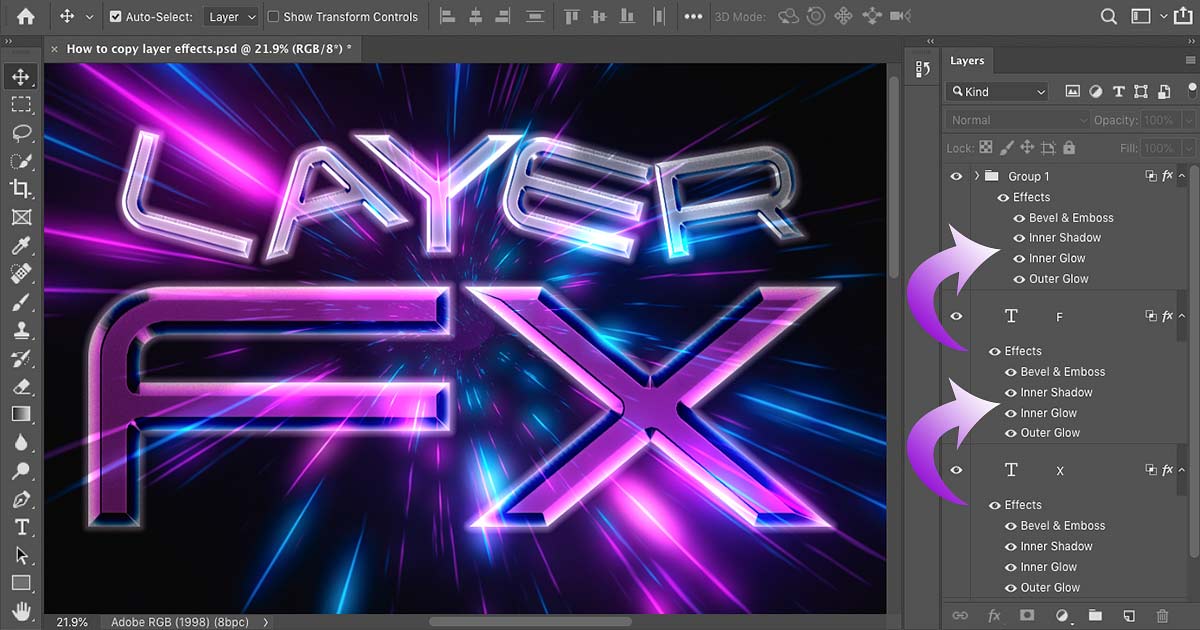
Photoshop how to copy effects from one layer to another. Press F7 on your keyboard if the Layers panel is not visible at the right side of the window. This now sets the effect to those options. 24082008 Open both your images in Photoshop.
At first Alt click on Layer mask which you want to copy. Rectangle 1 has an orange stroke and drop shadow defined by layer effects. Im sharing with you how to transfer or copy layers groups from one psd file to another in Adobe photoshop.
Open the image that you want to work with. In the one that you want to copy into another image do a Command A on a Mac or a Ctrl A on a PC to Select All. You then see a dialog where you can enter the name of the new Smart Object layer.
Right click layer with the effect you wish to copy select Copy Layer Style right click the layer you want to transfer the effect to and choose Paste Layer Style. Select the object you want to copy the effect from then open the Appearance palette. Converting different effects.
From the Select section of the Tools panel select the Move tool. Share Improve this answer. Most users of Photoshop should already know about layer effects.
In this article I will introduce the operation of copying layers from one PSD file to another PSD file in Photoshop. You can copy on layer style to another layer simply doing a right-click on the FX icon and choosing Copy Layer Style from the menu. And groups enable you to apply opacity settings blend modes and layer styles to multiple layers at a time.
To create a second copy of a Smart Object right-click on the Smart Object layer in the Photoshop Layers window. This is a huge time saving technique. These are the extra little tidbits added onto layers via the small fx icon in the lower-left corner of the layers palette.
Besides that Layer group makes it easy to turn several layers on or off at once in a photoshop document. Currently if you want to move a selected layer or multiple layers from one open PSD to another you have to. First well have to select Rectangle 1.
Double-click the effect you want to copy and itll open the dialogue box for that effect with the settings of that object. You can then select the Duplicate Layer option in the popup menu. Copy and Paste Layer Effects.
If you want to duplicate the effect rather than move it just Option-drag PC. Then select the target layer and right-click again then choose Paste Layer Style. Select the effect or property in the Timeline Panel beneath the layer and to copy it use CommandC if youre on a Mac or ControlC if youre on a PC.
Right-click the layer in the Layers panel that contains the styles you want to copy then click the Copy Layer Style option at the bottom of the menu. Copy individual effects Select an effect heading in the Effect Controls panel and choose Edit Copy or right-click on the effect heading and choose Copy. To move multiple layers at the same time link the layers together in the Layers panel by selecting the layers and then clicking the Link Layer icon of any one layer.
How about only onejust drag the little round f icon from the active layer to the layer you want it on and it relocates to that layer. You can also copypaste layer mask from one layer to another in the same or different open document. With the shortcuts defined we can quickly copy the layer effects from one layer to another using only the keyboard.
Then select the layer you want to paste it to and use CommandV if youre on a Mac or ControlC if youre on a PC. Rectangle 2 has none. You move the 2 PSD windows into 2 separate windows as shown below.
How to copy a layer from a PSD file is also quite simple first you open two PSD files to copy the layer and then perform the following steps. You can also hold down the Option key PCAlt then click and drag the. Here are two rectangles Ive drawn in Photoshop.
On your screen it will be shown as gray-scale mask.

Move Layers From On Photoshop Doc To Another Photoshop Layers Style Tile

28 Photoshop Elements Texture Tutorial Photoshop Elements Tutorials Photoshop Elements Photoshop

Collapse All Groups Photoshop Tips Photoshop Photography Photo Editing Photoshop
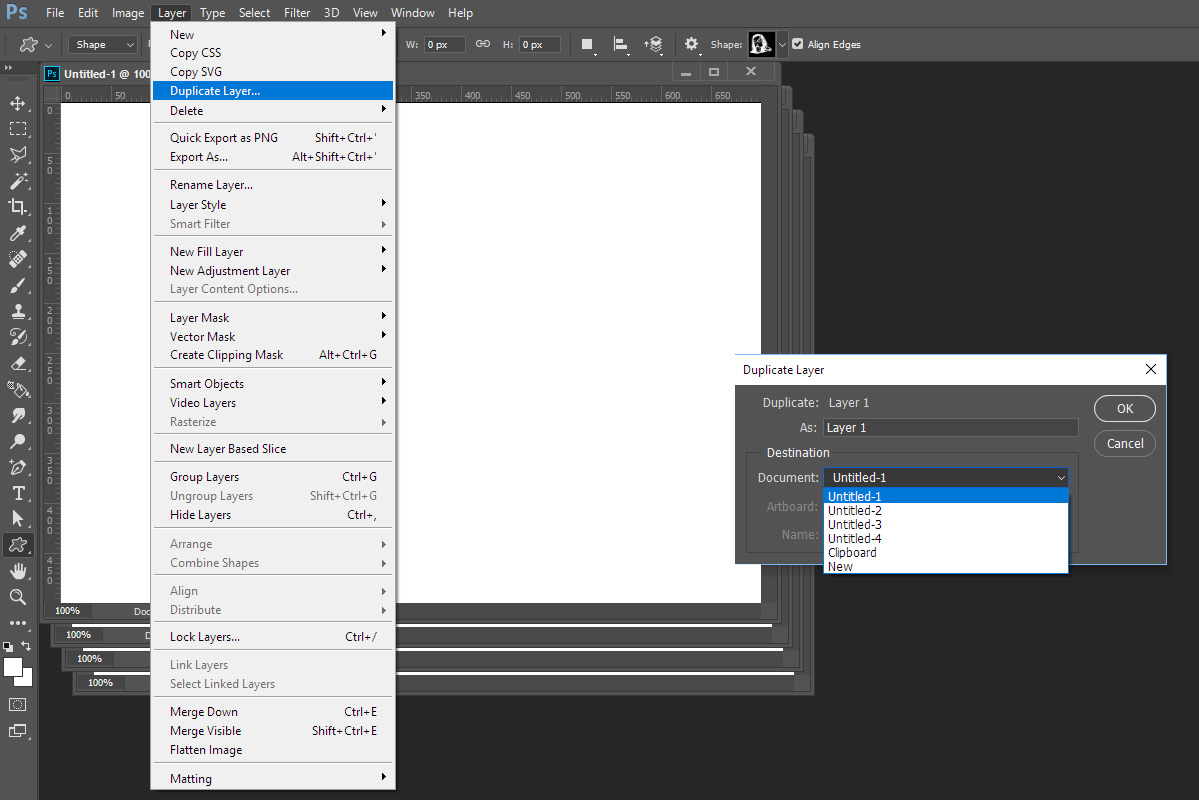
Solved Copy Layers In One File To Another File Adobe Support Community 9062237

How To Copy Layer Effects In Photoshop

How To Create A Vivid Ombre Text Effect In Adobe Photoshop Text Effects Photoshop Graphic Design Tips
How To Copy Layer Effects In Photoshop

How To Copy Layer Mask To Another Layer Or Document In Photoshop Photoshop Elements Tutorials Photoshop Basics Layer Mask

Easy Technique To Give Great Contrast To An Image Photoshop Tips Photo Editing Photoshop Photoshop

Selecting Multiple Objects Layers Photoshop Photoshop Tips Photoshop Tutorial

How To Copy Reuse A Layer Effect Style In Adobe Photoshop

How To Apply And Copy Layer Styles In Adobe Photoshop Webucator

How To Copy Clouds From One Photo To Another Using Adobe Photoshop Cs6 Photoshop Cs6 Adobe Photoshop Cs6 Photoshop

How To Copy Layer Effects In Photoshop

Adobe Photoshop Cc How To Copy Layer Styles Youtube

Activate A Layer Just By Clicking On It With The Move Tool Photoshop Tips Photoshop Tutorial Photoshop

How To Copy Layer Effects In Photoshop

Fuel Lethal Blue 14 Wheels 32 Intimidator Tires Polaris Rzr Xp 1000 Pro Xp Ranger X Photoshop Elements Tutorials Photoshop Elements Photoshop Tutorial

How To Copy Layer Effects In Photoshop


Posting Komentar untuk "Photoshop How To Copy Effects From One Layer To Another"