Excel Print Subtotal Each Page
Click the Collapse Dialog icon next to Rows to repeat at top field. I display the sheet in Print Preview and then fill the column with text entries using the same entry per page.
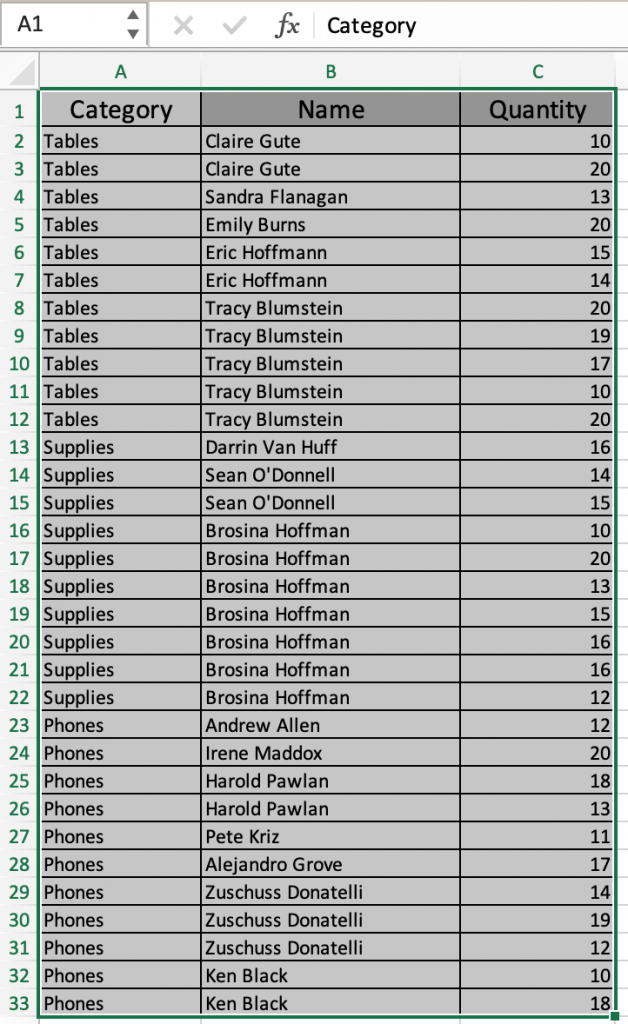
How To Print Each Subtotal Group On Separate Page In Excel
Teachable online training classTeachable class.

Excel print subtotal each page. I have to print the inventory of my company. When I print it Id like to print a page subtotal and running total at the bottom of each page. Excel Version 2016 Firstly apologies if I have not adhered to any of the Forum rules it is my first post.
But this will tedious and time consuming. Summary below data - if this box is checked the subtotals are placed below the data the default. Would make it easier to code.
When a new month is detected in Column A a new row is inserted with subtotals for that month. Find Rows to repeat at top in the Print titles section. To specify a summary row above the details row clear the Summary below data check box.
Pretty simple I thought until I discovered excel do not provide the function to do this ie. Yes that is correct if you wanted a general purpose routine and you. These cells are filled by data that are into a text file.
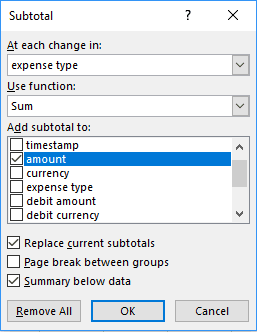
Do sum totals in footers Grrrrrr. Otherwise the subtotal formulas are placed above the totals. Of course you can insert the subtotal formulas as you need manually at the correct position.
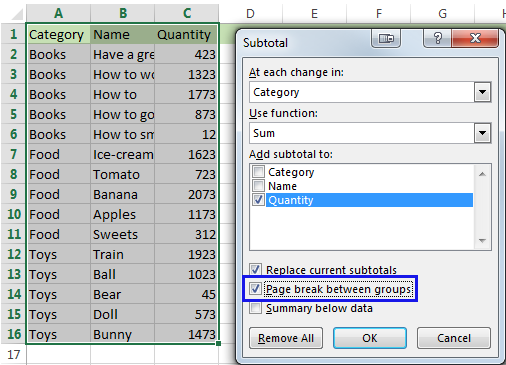
Page break between groups - if this box is checked Excel inserts a manual page break after each subtotal. In the Subtotal dialog you can choose to have a page break between groups. Supposing you have hundreds rows of data and you want to automatically insert subtotals of each column at the bottom of each printed page.
So you can use the Paging Subtotals to. However you may decide that you want 50 rows per page say so that. Would also need to take account of any headerfooter space etc.
Select the cells to apply subtotal on the data. So you can use the Paging Subtotals to get it done as follows. InsertSubTotal RangeA65536EndxlUpRow 1 PreviousPageBreak False Page Subtotal RangeA1Select ApplicationStatusBar False End Sub Private Sub InsertSubTotalRowIndex As Long PreviousPageBreak As Long InsertNewRows As Boolean LabelText As String contains all editing necessary for each subtotal at the bottom of each page.
Click OK to insert subtotals. If you have a long list of data in the Excel spreadsheet and you want to print them with subtotals. Hope this article about How to print each subtotal group on a separate page in Excel is explanatory.
End of page and calculate totals every page. At this stage I use a manual method for the subtotals - add an extra column that is used to indicate the page number I hide the column before printing. You can go to the view option to check or the Page Layout option where the breaks option seems inactive.
For more about subtotals see Add Subtotals to a Data set on page 298. Of course i want to do this with an automatic way-formula and not manually finding the end of each printed page and adding the formula for that page. Open the worksheet that you want to insert subtotals of each column at the bottom of each printed page and apply the.
Pretty simple I thought until I discovered excel do not provide the function to do this ie. Open the worksheet that youre going to print. Inserting subtotals of each column at the bottom of each printed page.
Printing subtotals on each page. An alternative solution would be. I want a sum total in a footer for each page.
And you will see the results as follows. My data is sorted by customer in column A. The easiest way to do this is to add a subtotal by using the Data Subtotals command.
On this report we will need to have letter head customer information invoice no and so on then the detail of the invoice products qty price etc. Click on Print Titles in the Page Setup group. Tick the Box Page break between groups.
But we need. We produce Schedules of Works with the furthest most right-hand column this being F. I want to put each customer on a different page.
- Excel Version 2016 Firstly apologies if I have not adhered to any of the Forum rules it is my first post. Kutools for Excel includes more than 300 handy Excel. I want a sum total in a footer for each page.
Printing subtotals on each page. This text file is created by a script realized with Python. In the Add subtotal to box select the check box for each column that contains values that you want to subtotal.
Print subtotals on each page or at end of month by RonBurgandy Sat Dec 14 2013 200 am. How to print subtotal in each page and grand total at the end of the page on Excel using Python. You need to open the worksheet where you want to insert subtotals of each column at the bottom of each.
With Kutools for Excels Paging Subtotals you can easily insert the subtotals at the bottom of each page at once. Inserting Subtotals of Each Column at the Bottom of Each Printed Page. Supposing you have a long list of data in the worksheet as shown in the following screenshot and you want to print it with subtotals of each column fitting on each printed page.
Adding page breaks using Subtotals in Excel by Chris Menard. If you want an automatic page break following each subtotal select the Page break between groups check box. Add the values page1 to all the rows less 1 on page1 page2 to the rows on the second printed page etc.
How To Print Subtotal In Footer Of Each Page In Excel in hindi Calculate and print Sub Total grand total at the end of each page in footer without VBA. Make sure that youre on the Sheet tab of the Page Setup dialog box. When I open the excel file all the cells are filled with data and there are 3 cells where excel calculates the.
I have requirement to build invoice print out on excel using Odoo 10 as platform. It is a 150 pages Numberss list. Do sum totals in footers Grrrrrr.
Switch to the PAGE LAYOUT tab. Remove All - this button removes all subtotal formulas in the list. I want in every printed page last line of every page to insert the sum-subtotal of the current page and the sum of the current page plus the total sum of the previous pages.
In the example above you would select Sales. Hello I have an excel file with 5 columns and a few hundred of rows. Do as below steps.

How To Insert And Print Subtotals On Each Page In Excel Office 365

Microsoft Office Excel Tip Alt A B Apply Subtotals Source Www Theittrainingsurgery Com Microsoft Excel Tutorial Microsoft Excel Formulas Excel Tutorials

How To Quickly Insert Subtotals In Excel

Quickly Inserting And Printing Subtotals On Each Page In Excel
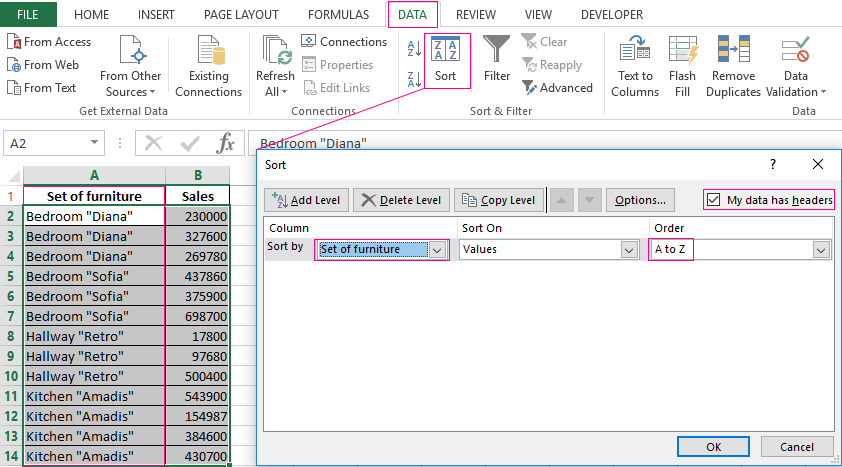
Subtotals In Excel With Examples Of Functions
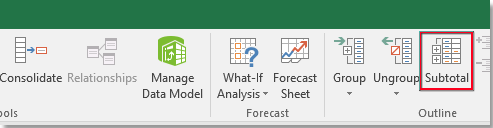
How To Print Each Subtotal Group On Separate Page In Excel
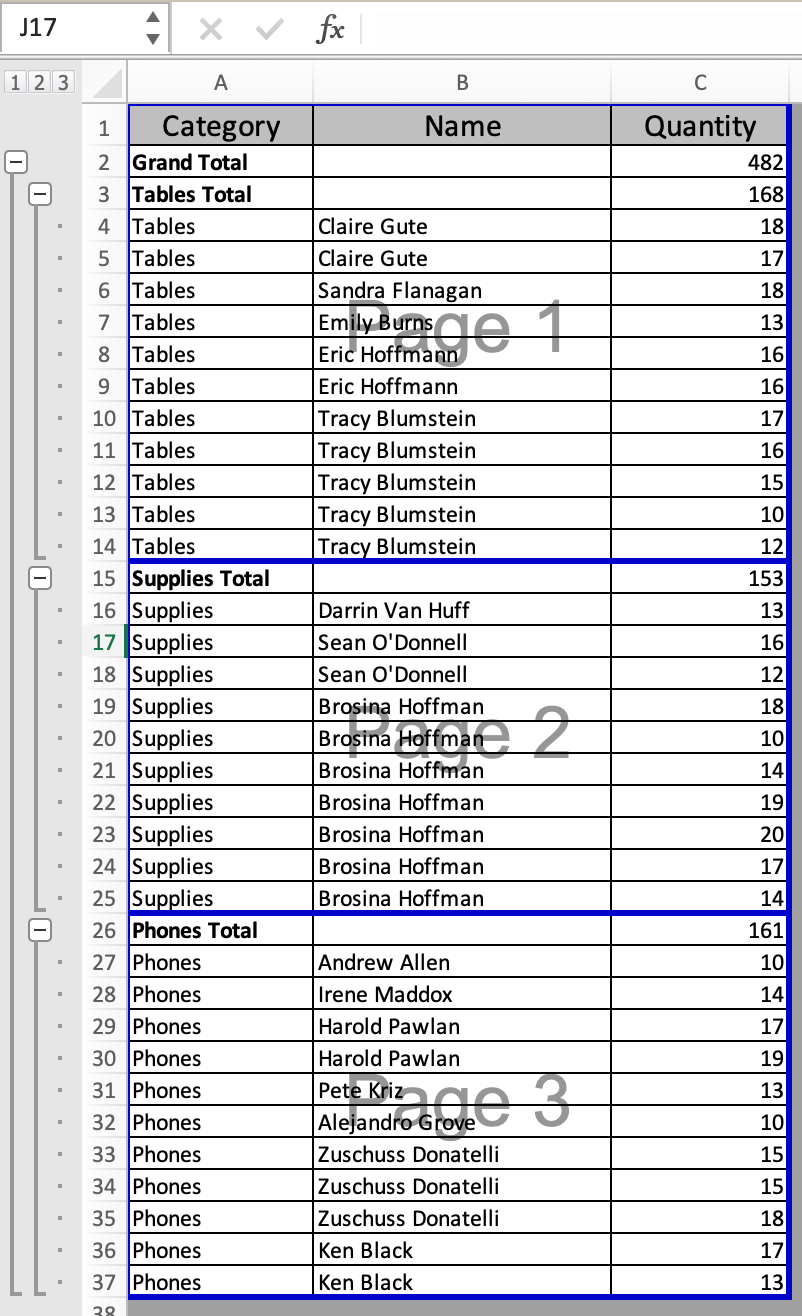
How To Print Each Subtotal Group On Separate Page In Excel

Quickly Inserting And Printing Subtotals On Each Page In Excel

How To Use Excel More Effectively 10 Great Excel Tips Tricks Excel Excel Tutorials Excel Hacks
Quickly Inserting And Printing Subtotals On Each Page In Excel
The Excel Subtotal Function Calculations On Filtered Visible Cells Only


Advanced Excel Formulas Functions Examples Myexcelonline Excel Formula Microsoft Excel Tutorial Excel Tutorials

Display Missing Dates In Excel Pivottables My Online Training Hub Excel Dating Print Layout

How To Insert And Print Subtotals On Each Page In Excel Office 365
How To Print Each Subtotal Group On Separate Page In Excel

Subtotals And Page Breaks In Excel By Chris Menard Youtube

Quickly Inserting And Printing Subtotals On Each Page In Excel

Screenshot Of Excel 2013 Reading Data Excel Homeroom
How To Copy Computed Subtotals In Excel Microsoft Excel 2016


Posting Komentar untuk "Excel Print Subtotal Each Page"