Windows Media Player Color Problem
If you still have issues after that then change this setting in madVR. When in Full Screen go Alt-Enter to go to Windowed Mode yes yes i said you should keep FSM but with your WMPC player notice that your TV will keep in HDR mode and you finally and hopefully will see your Desktop and Icons with more vivid Colors Right.
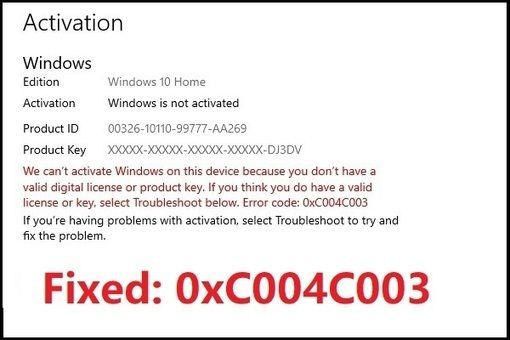
4 Methods To Fix Windows 10 Activation Error 0xc004c003 Computer And Technology Windows 10 Fix It Method
Scroll down and expand Media Features select the Windows Media Player check box and click OK.

Windows media player color problem. In my case GeForce 6800 GT-On the. MadVR options devices HDR select tone map HDR using pixel shaders. And your are not allowed to select Black as a colour because I think they are scared people will get depressed or something like Sony did with the XMB.
Ever since the version that shipped with Vista 11 and even the one in Windows 7 12 you have only been able to colour the top button bar. Windows Media player should now be reinstalled. Windows media files colors screwed.
I first thought there was something wrong with my recording software so i unre installed it. Click the Windows Setup tab. I am pretty sure I caused this duh but dont.
Odds are Windows Repair will find and fix your problem. First sorry if this is a repeat. Try this fix only if youve a NVIDIA card.
It might sound like an extreme option but youll thank us later. After WMP 10 they stupidly removed the ability to colour the player completely. My problem is that everything I watch on WMP is washed out looking.
Windows Media Player WMP is a media player and media library application developed by Microsoft that is used for playing audio video and viewing images on personal computers running the Microsoft Windows operating system as well as on Pocket PC and Windows Mobile-based devicesEditions of Windows Media Player were also released for classic Mac OS Mac OS X and Solaris but development. Scroll down and expand Media Features clear the Windows Media Player check box and click OK. -Open a WMA file to have it going to see if it fixes the problem as you go along-Go to your display settings and click Advanced-Click your nVidia card tab.
I looked and didnt find anything too similar. Troubleshooting window on the left side of the panel click on View all. A simple setting that makes your videos look like they shouldIf you liked the video then subscribe.
Select Adjust video color settings choose With the Nvidia settings. Next scroll down click on the Windows Media Player. The videos I have tried so far are WMV videos that were produced by different people with different tools so Id rule out problems with the video material.
And i went into media player settings colorbrightness etc and put teh brihtness right up and teh blotchy colors and. And allow media player to control the color settings. Ditch Windows Media Player If all else fails get a better media player.
That didnt fix the colors so i tried watching a regular mp4 to see if the problem. Media Player Classic Home Cinema or simply MPC-HC. Clear the check box for this option and then.
You may have to turn off the video color control for your video card if it has a control panel. The problem occurs in all video players ive tried windows media player even mplayer2 winamp real quicktime. Ive uninstalled the apps ive downloaded to play the divx5 files but the problem persists.
If the Video Compression option is selected it may not be installed. In Advanced change the color range from limited 16-235 to full dynamic range 0-255. AVI videos are displayed well but all the other formats are played with the wrong colors greenish almost black and white.
Windows Media Player should be uninstalled. You can adjust both or just the media players settings. Control Panel View by Large icons click on Troubleshooting.
Click on the Start button search box type Control Panel click on the result. You can use the target peak nits value to adjust the brightness. Properly and needs to be removed.
Go to NVIDIA Control Panel Right-click on Desktop. Recently when i use windows media player to watch recorded game play the colors appear negative. So Ive decided to implement this in one of the most popular open source media players for Windows.
Even with lookup tables and SIMD optimizations they are quite slow. All Video Settings sliders in Windows Media Player Hue Saturation Brightness Contrast are on their default values. The problem with current color management systems CMSs is that they use the CPU.
Click Apply and restart VLC. MPC-HC Options Playback Output Video Renderer madVR. In the Components area scroll to and click Multimedia.
See the ratings and comments on either media player-- Advertisement --. Anyway your video card has color settings and so does media player. Most geeks do and we lean towards using PotPlayer or VLC Media Player.
In other words colors are lighter as if I were watching a copy of a copy of a VHS tape.

Vmping Visual Multi Ping V1 3 16 المجاني In 2021 Visual Software Color Coding

Qzxtbc4bo3jy M

How To Reset Yahoo Password On Iphone Toolhip Howtoresetyahoopasswordoniphone Howtoresetyahoopasswordoniphonebyusingthemobileapp Iphone Reset Passwords

Lenovo Thinkpad Boot Problem Fix A Lenovo Laptop Stuck On The Boot Menu Solution 1 Unplug All The External Devices In 2021 Lenovo Lenovo Thinkpad Lenovo Laptop

Top 5 Best Blu Ray Folder Players Leawo Tutorial Center Folders Blu Ray Windows System

How To Play Youtube Videos On Vlc Leawo Tutorial Center Youtube Videos Youtube Video Subtitle

What Is Hxtsr Exe In Windows 10 And Should You Remove It Marketing Strategy Social Media Digital Marketing Social Media Microsoft Windows Operating System

How To Optimize Windows Media Player Video Streaming Video Streaming Streaming Video

Pin On Technology Tips And Tricks

Pin On Technology
How To Get Early Access To New Onedrive Features Jw Library Microsoft Windows How To Get

Auto Change Wallpapers On Windows 10 Windows 10 Windows Wallpaper Windows 10

Play 4k With Windows Media Player Players Media Play

Windows Media Player Alarm Clock Using Task Scheduler

Pin On Software I Love

Common Problems With Sony Walkman Mp3 Players Include The Device Freezing Static Or Other Noise Playing In The Background Of Your Fi Sony Walkman Sony Walkman

How To Customize Folders Icon With Different Colors In Windows Full Hd Custom Folders Folder Icon Custom


Dnspy 6 1 7 Windows 10 Download Engineering Tools User Interface


Posting Komentar untuk "Windows Media Player Color Problem"