Software For This Printer Isn T Available From Apple Canon
IJ Printer Driver for Linux Operation guide This is a instruction manual for the Linux printer drivers. Next click Add a printer or scanner which should open the printer installation window.

Looking For The Process To Configure Your Canon Printer On The Windows And Mac Device Then You Are At The Right Page As Here Macbook Macbook Laptop Supportive
With that setting enabled please download the software from our site once more.

Software for this printer isn t available from apple canon. Log on to the computer with an administrator account. Click Devices and Printers. Click Next to begin installation.
Note that even if you delete the USB class driver it will be installed again automatically when you connect the printer and your computer with a USB cable. In the General tab of the System Configuration Utility window click on the Selective Startup radio button. Also if the printer is connected then try the steps below.
Click Software Update. There is no driver for the OS Version you selected. For example I have a Canon MP610 on one of my Macs.
Click Easy Install Install. Before installing the new Printer Drivers you need to uninstall the printer by following the steps given below. Software for this printer isnt available from Apple.
To obtain the shipping address of Canon USA Inc. Select Remove Device from the top of the screen. On your Mac choose Apple menu System Preferences.
The Canon PRINT InkjetSELPHY app is a free software application that allows customers using the iPad iPhone or iPod Touch and Android based smart phones or tablets to enjoy a variety of PIXMA printing capabilities such as wireless printing and scanning. When I do so it comes with this message. Printer Pro is an app for iOS devices that enables them to.
Select your Canon Printer. Change the setting of the access point so that the MAC address of the printer. Press the Windows key on the keyboard and then press R.
If you have a Mac with a printer attached you can turn it into an AirPrint printer using HandyPrint. Check the printer manufacturers website for compatible Printer Drivers that will work with Windows 10. Or Canon Canada Inc please call the Canon USA Inc.
Click Printers Scanners. Right click an empty area of the device list then click Reset printing system. Run the setup program to install the printer again.
In the Open box of the Run window type msconfig and and then click OK. Sudo nano -w SystemLibraryCoreServicesSystemVersionplist. Some models you see here may not be available in your region.
It should install without difficulty. Click Reset in the confirmation window. Click Printers and Scanner Print and Scan or Print and Fax.
Download apps by Canon Inc including imagecanon Mobile File Transfer Content Transfer Mobile and many more. Press the Setup button on the printer. Go to Wireless LAN setup and then Press OK.
Usually youll find a much smaller download that contains only the driver s that you need. Using This Online Manual Symbols Used in This Document Touch-enabled Device Users Windows Symbols Used in This Document Warning Instructions that if ignored could result in death or serious personal injury caused by incorrect. Press cmdshift3 to take a screenshot Then use the arrow keys to navigate to the version number underneath ProductUserVisibleVersion and change them to 10103.
If you see a message that software isnt available for your printer you may need to update the printer database on your Mac. If printer software isnt available on Mac. If software for your printer isnt available using Software Update you can contact the manufacturer for information.
The driver may be. In the Apple menu choose System Preferences then choose Security Privacy then choose the General tab. If you dont do this you may see a message that software isnt available when you connect your printer.
Click on your printer or if the name of your printer doesnt appear click the the printer that I want isnt listed link to add it manually. The applicable models are iP2700 series MX340 series MX350 series and MX870 series. Easy-PhotoPrint EX delivers plenty of creative options to PIXMA owners including the ability to produce borderless photos albums calendars and even photo stickers.
First make sure your printer is actually listed there because if it isnt then you wont be able to install the printer on OS X no matter how hard you try. The list of AirPrint printers is growing but there are still a lot of printers particularly older models that dont support it. It is recommended to download this file if you prefer a hard copy printed manual.
Shipping charges if any must be prepaid. Insert the Setup disk in computer. On Canons website it says.
During the wireless setup in the software installation when the Check Printer Settings dialog box is displayed try the solutions 1 to 4 one by one in order. Canon Easy-PhotoPrint Ex software allows you to print great looking photos in a way that is easy fast and fun. Canon IJ Network Scanner Selector EXapp.
Connect the printer and your computer with a USB cable and turn ON the printer. Help Desk at 1-800-828-4040 or Canon Canada Technical Support at 1-800-OK-CANON. On your Mac computer click the Apple icon in the upper-left corner of your screen then click System Preferences.
Choose Apple menu System Preferences then click Software Update to make sure macOS has the latest information about printer software it can download from Apple. Firstly you have to manually download the printer driver package for your printer brand from Apple. No choices are available in the drop down box for driver.
The download via Software Update was a measly 74 MB. Software for this printer isnt available from apple when trying to add the printer. Select Easy Setup and Press OK.
It may be that your printer isnt compatible with macOS. You can see a list of all the printers supported by Apple on this page. Ver210 The Diagnose and Repair function.
Right-click the blank space in the Printers list and then click Reset printing system. Before downloading this gigantic file which contains drivers for ALL Canon printers run Software Update first. Enter an administrator username and password and then click OK.
- When the XPS printer driver is selected the On-screen manual for the XPS printer driver will be launched from the Troubleshooting window. Install any software updates listed for your printer. Press ControlX to exit.
Type Printers and Scanners into Start then click on the top result. If your Toner or Drum is covered by this limited warranty a new Toner or Drum will be shipped to you without. Repeat for the version number displayed under ProductVersion.
I have a Canon MG5550 printer and on my old Mac I had upgraded to Big Sur and the printer seemed to operate with no problems. To print from an iPad iPhone or iPod Touch the printer must have Wi-Fi and also support AirPrint. Click the Apple menu icon and then click System Preferences.
On the new page click Printer on Network. TS5300 series PDF User Manual Windows Instructions on product functions and software are provided in this PDF manual. Contact the printers manufacturer for the latest software.
Under the under the header Allow applications downloaded from choose Anywhere.

However If In Any Step You Feel Uncomfortable And Can T Perform It Then You Can Take The Online Assistance From Wwwcanoncom Printer Wireless Router Wireless
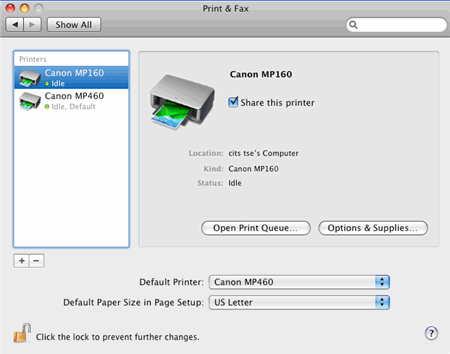
Canon Knowledge Base Uninstall And Reinstall The Printer Driver For A Mac

Top 10 Best Wireless Fax Machines In 2021 Hqreview Printer Scanner Wireless Printer Printer
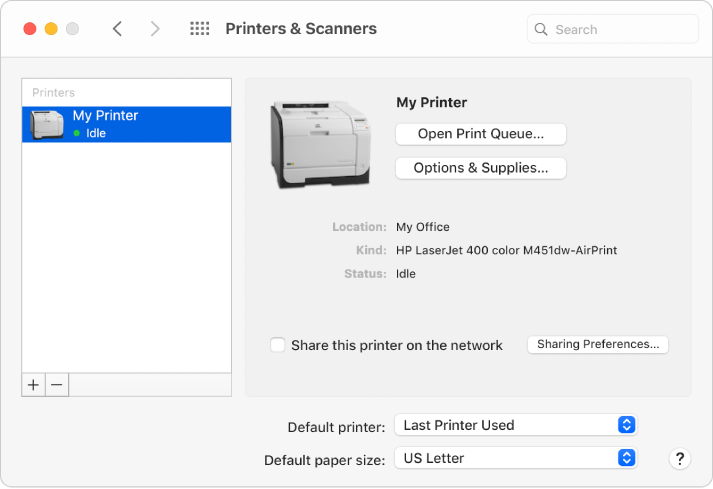
Update Printer Software On Mac Apple Support

Pin On Hcom123setup

Canon Imagerunner Advance C250i Drivers Download Reviews Printer Standard Imagerunner C250i Win Apple Pc Driver Download Linux Canon Imagerunner C250i Driver

How Do I Connect My Phone To Wireless Printer Wireless Printer Best Printers Printer

Hp Envy 5534 Printer Installation Guidance Printer Driver Installation Software Update

Canon Knowledge Base Opening The Canon Ij Printer Utility

C5 W8jfiz0lstm

Solved How To Bring Canon Printer Offline To Online On Mac
Complete Printer Setup Guidance Printer Setup Wireless

Canon Pixma Mg6620 Wireless Color Photo All In One Inkjet Printer 51 Off Ad Deals Pixma Photoprint Printer Driver Printer Inkjet Printer

Learn Useful Ways To Connect Canon Pixma Printer To Mac Posts By Canon Com Ijsetup Printer Connection Mac

Canon Knowledge Base Opening The Canon Ij Printer Utility

Canon Tech Support Phone Number 1 855 560 0666 Provide Best Solutions

1982 Apple Dot Matrix Printer Old Computers Computer Printer
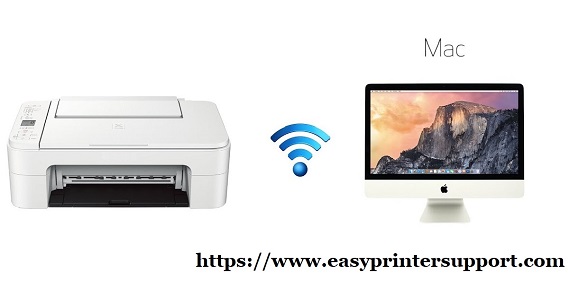
How To Connect Canon Printer To Mac Very Easily

How To Get Canon Printer Online On Mac Printer Apple Menu Printers Tray


Posting Komentar untuk "Software For This Printer Isn T Available From Apple Canon"