Lg Cannot Save Photo
After the LG V30 has been rebooted the media scanner of the Android will begin to search for new images on every reboot which would allow the missing image to appear again in the gallery app. To remount your SD card follow the steps below.

Hardy 9 Mil Nitrile Powder Free Gloves Large 50 Pc For 9 99 Through 1 20 2020 Nitrile Gloves Disposable Gloves Gloves
Camera not saving photos LG K20.

Lg cannot save photo. Select this option to save the image in both RAW and JPEG formats at the same. Go to the General Tab. On the primary interface please choose Super Toolkit from the top menu bar click the Backup or Restore button.
Look for photos repeatedly or turning LG on and off which are likely to overwrite data thus increasing the difficulty of recovering pictures. Up to 7 cash back While viewing an album the following icons are displayed at the top of the screen. How can you get your picture from and that is and lock screen on phone.
I want Google to send me my pictures and contacts and my text to my new phone. Im baffled by this problem can anyone help. Alternatively you can transfer all of the photos from LG to computerlaptop by 1 click.
Browse location to save the recovered files. In this video I show you how to save a picture MMS from your text messaging app on your Android phone. However here how you can fix the issue.
If I take a picture with Instagram it saves to the SD card with no issues. Under Portable Devices locate your mobile device then right click and select Update Driver Software. List of found photos videos and music files appears.
Tap on the update button to update the application. To revert back to the original default settings use Picture Reset. Allows you to select one or more photos to shareTap Share at the bottom of the screen to open the available sharing options such as Messaging or Bluetooth.
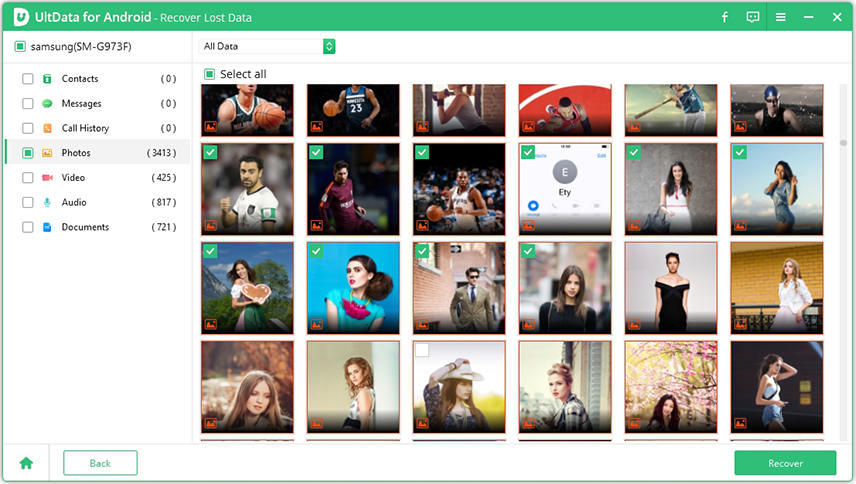
Preview and click Recover. Stock Sprint LG G7 with factory LG gallery app. Most likely your SD card is broken.
Stellar Photo Recovery is a reliable and intuitive software that lets you recover your photos with ease. Click the Start button type device manager in the search box then click Device Manager. I cleared all my cache too.
How do I get my pictures back to my gallery from my LG V20 phone. Once the SD is unmounted there are 2 ways to remount it so. ALL FILES ASSOCIATED WITH THE CAMERA WILL.
Then I notice that screen shots are saving fine but still cant save anything from the. Camera cant save pictures. I had this issue with my galaxy S5 and it is a problem with saving to the SD card.
Allows you to select one or more photos to deleteTap Delete at the bottom of the screen to. Same pop up when you press the record video. The easiest and most convenient way that you can fix the missing pictures or videos on the LG V30 is to reboot your smartphone.
In Manual Mode press the 4th button on the left column from the top to change from. When I try to save photo from a received MMS and press download button toast states photo saved to messages folder. Today I tried taking a picture and on the bottom of my camera screen after taking a picture it says cannot save.
This is a new problem. LG K20 on MetroPCS. Select Browse my computer for driver software Let me pick from a list of device drivers on my computer then select MTP USB Device Next.
My default save is my sd card which has plenty of space as does my interal save. When i take a photo it says Cannot Save and deletes the photo. Right after snapping a photo a message popped up saying photo cannot be saved.
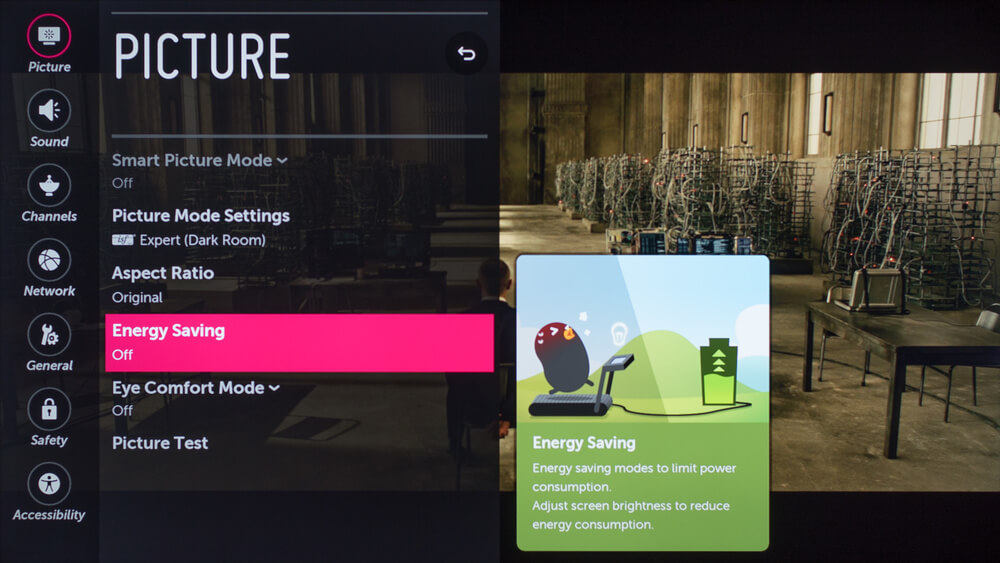
I got a used lg g6 says thinq-moron lg with their dumb names today because my screen broke and to have it as a backup. Steps to fix photos not saving issue an android 10. Your LG TV comes preset with default picture mode settings.
Restart LG V30. JPEG Only to JPEGRAW mode. I immediately went and deleted a boat load of my saved gallery.
You can adjust those settings to accommodate your viewing environment. When taking a photo with thw default camera I get the message cannot save no other details are provided. Update the Google Camera App from play store.
Click Export and then Export to PC and select a destination folder to save the photos. Photo does not appear. THIS WILL EFFECTIVELY FACTORY RESET THE CAMERA APP.
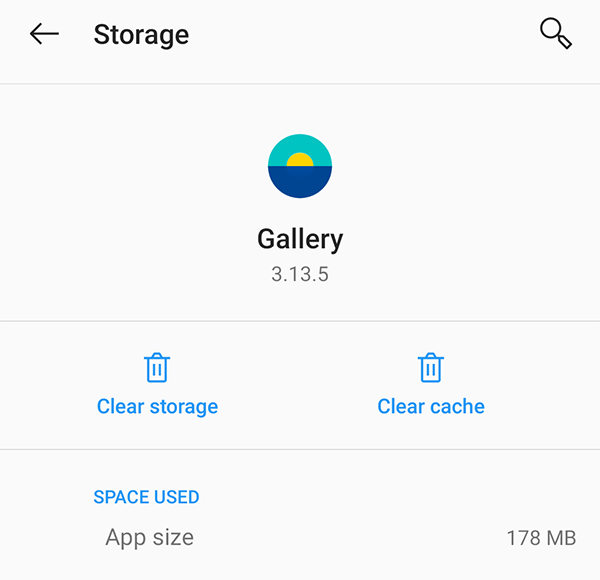
Select the Camera app from the list. I use the phone as an internet source at home instead of paying another bill. Because the photos in LG phone are deleted or disappeared for some reasons they are not really missing and hide as a kind of useless data somewhere inside the phone memory.
Upvote 140 Subscribe Unsubscribe. You can recover deleted or inaccessible photos from all types of storage media. Select Apps Notifications from the list.
Check if you are able to access these photos. RAW formatted pictures offer more editing freedom when being manipulated. Sometimes a new big new update tend to change the default settings of certain apps.
I also show you how to save a picture from the web. If the issue does not occur then the problem could be caused by a faulty microSD card. When taking a picture immediately after it snaps can not be saved pops up for a second.
Search for Google Camera tap it. Close the application to finish the process. Community content may not be verified or up-to-date.
I noticed for the first time last week got the v20 in early December that when I tried taking photos when accessing the camera when the phone is locked the photos wouldnt save. The SD card isnt full about 8GB free and it appears that only the default camera app cant save photos. Without affecting picture resolution and clarity.
I would suggest that you get a new card. Try a different card. Click on Unmount SD card option and in the warning dialogue that appears click Ok.
Click on Settings in the home screen and select Storage. Reset the phone freed up storageand updated Google photos. My same sim card is in a new phonenot all my pictures are on my phone how can I get them.
Has anyone else had issues with their photosvideos not saving. Such errors can also arise if the SD card is not properly mounted. Press the SMART button on the remote control and select Settings PICTURE.

Hardy 5 Mil Nitrile Powder Free Gloves 100 Pc For 5 99 Harbor Freight Tools Nitrile Gloves Gloves
Lg Tv Picture Menu Settings Lg Usa Support

How To Fix Camera Not Saving To Sd Card On Android Iphones
Lg Tv Too Dark Brightness Problem Fix Comic Cons 2021 Dates

Hardy Mechanics Gloves For 4 99 Mechanic Gloves Gloves Work Gloves

3ul 3ede27u55m

Lg Mobile Support Tool Download Phone Info Supportive Lg Phone

Lg Optimus Net Android Prepaid Phone Net10 Lg Optimus Net Android Prepaid Phone Net10 Price 54 99 Prepaid Cell Phones Prepaid Phones Phone

Top 8 Fixes To Photos Not Saving To Gallery Android

Music Stripes Lg G8 Thinq Case V40 Lg G6 Lg V30 Case Lg V20 Lg Stylo 4 Moto X4 Moto G7 Play Power Z2 Z4 Force Moto G5 Plus Moto G6 Play
Top 8 Fixes To Photos Not Saving To Gallery Android

Exciting Happenings We Re Offering 15 Of Framing Printing And Boutique Items For Not One Day Not One Week But For The W Holiday Sales Grand Rapids Prints
Top 8 Fixes To Photos Not Saving To Gallery Android
Limited Time Save 65 Now Anti Spy 360 Magnetic Adsorption Phone Cas Stylish New Deals T Mobile Phones Iphone Case Protective Phone Cases

Top 8 Fixes To Photos Not Saving To Gallery Android

Pin On Products

Lg Stylo 3 Plus Smartphone Lgmp450 Metro Pcs Lg Bar Smartphone Samsung Galaxy Phone Pcs

Pin On Washers And Dryers

Blue Star Ac Service Centre In Mumbai Air Conditioner Repair Air Conditioner Service Ac Repair Services


Posting Komentar untuk "Lg Cannot Save Photo"