How To Delete Apps On Zte Phone
Select the Apps tray then select and drag the desired app up to Uninstall. You will see the ZTE logo followed by a recovery menu hold down these three buttons until it displays.
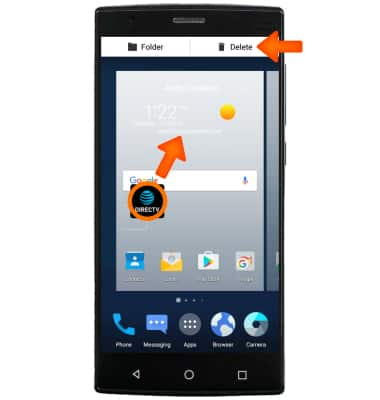
Zte Zmax 2 Z958 Remove An App At T
Do one of the following.
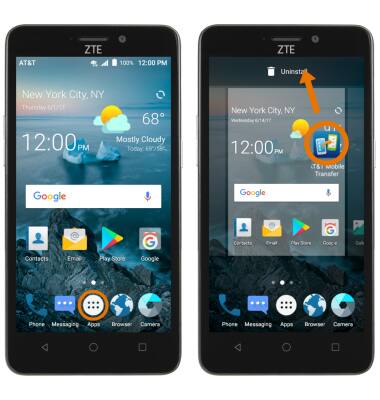
How to delete apps on zte phone. And hold the app from the App Tray and drag it to a home screen. Hi Andrew I cant find a list of pre-installed apps on the specific phone model that you mention. Some Scenarios Where ZTE Data Loss will Occur.
REMOVING WIDGETS OR SHORTCUTS 1. If you are in possession of the phone though you can just factory reset it to find out if the list is extremely important to you. Now Drag the App and Drop it into Uninstall Icon.
Tap Uninstall OK. Up to 6 cash back REMOVE APPS FROM HOME SCREEN. Open the Settings app on your phone and scroll down to About Phone.
How to Remove Bloatware on Android phones and Tablets. You would need to go into Settings then Apps and finally All Apps. Removing an app from the home screen does not delete the app from the device.
Tap Application manager Device section. Tap Manage apps devices Manage. ZTE Blade Vantage - Uninstall Apps From a Home screen navigate.
Tap the desired application. Tap and hold on an app located in the app drawer or on the home screen. Just like the experience of the helper at the beginning of the article when you want to delete some unwanted data you accidentally clicked wrong causing some important files to be deleted.
Press and hold a shortcut. The phone will shut off. Locate then select the appropriate app.
Remove applications 1 Go to Settings Applications Manage Applications then choose the application you want to close and select. There should be a button on the next screen to both Force. Uninstall Using ZTE App Settings.
In the free version you can only remove one app at a time. First Method The preloaded apps cannot be uninstalled like regular apps on your Android phones. Scroll down and select Mopria Print Service.
Swipe right to the Downloaded screen. Select an app you would like to remove. Scroll down and tap Apps.
If you dont need to print from your ZTE phone you can try to uninstall our App using the ZTE App manager. Tap the name of the app you want to delete Uninstall. REMOVE APPS FROM HOME SCREEN.
Tap Grant to get the apps main window. You can now tick the apps you want to remove on the right-hand side. Swipe The Menus Icons Left or Right and Choose an App that You Want To Uninstall.
To uninstall the app. Some Android phones such as ZTE. Here are some events that may cause you to lose your ZTE phone data.
Sometimes we accidentally or unintentionally ins. From the home screen select and hold the desired app then drag to Remove. If you delete or disable an app you can add it back to your.
Removing an app from the home screen does not delete the app from the device. Go to Settings and choose Applications Manager. Boot the phone in recovery mode.
Steps to disableremove any pre-installed apps on your Android Phones. If system apps arent visible tap the Menu icon upper-right Show system. Find the app they should be listed alphabetically and click on it.
First hold the power button until you see three options in a pop-up. Select the Apps tray then select and drag the desired app up to Uninstall. Some pre-installed applications cannot be uninstalled from the device but can be.
Go on your phones setting menu. Press and hold a widget or shortcut on the home screen. ORGANIZING SHORTCUTS WITH FOLDERS 1.
Now and this is important at the same time hold down the menu bottom left button volume up key and power button at the SAME time. Select apps at the bottom of the menu. From the home screen select and hold the desired app then drag to Remove.
Tap and Hold the App. A new folder is created. Uninstall app From any Home screen tap Apps Settings Apps.
Open Settings on your Android phone. How to uninstall or delete Hidden apps from your phone. From the options presented choose either Backup and delete or Delete without a Backup.
If its your first time opening the app you will have to give the app some permissions such as photos media and files on your device. Tap on System Apps to see a list of all the apps on your device. Choose the application you want to remove and select uninstall.
From the side menu select APP NextPit. Scroll down to find Clear defaults. 2 Go to Market Downloads.
At the top right tap the profile icon. Step by step instructions. If you could explain why you need the list maybe I could suggest an alternative solution.
How to remove spying or hidden apps from your phone. Drag it to the Uninstall section that appears on. When you click on it the default app will be deleted.
The user has to either block the preloaded apps or totally disable them. Heres how you can disable the preinstalled apps on your Android phone using a few simple steps. An Uninstall Icon Will Appear on the Top.
Drag it to at the top of the screen to remove it. Enabling USB Debugging on your phone. Drag it to at the top of the screen.
Locate the Apps you wish to turn offdisable and tap to open. Also disabling an app doesnt really remove it from your phone. Tap on the Build Number seven times.
Up to 6 cash back Move or uninstall Apps from your home screen and delete apps from your device. All it does is temporarily make them disappear from the list- they still do exist in your device in the background.

How To Bypass Google Account Zte Blade A320 Android 7 1 1 By Adb Tool Android Tutorials Google Play Apps Smartphone Hacks

Zte Blade A2s Unveiled Large Screen And More Memory Mobile And Gadgets Lighted Bathroom Mirror Mirror Bathroom Mirror

Turn Off Activation Lock Apple Support Unlock Iphone Unlock Iphone Free Iphone Information

What We Do Unlock Unlockiphone Icloud Removeicloud Swiftunlock Swiftunlock Unlock Unlockcode Wholesale R Coding Apps Iphone Unlock Code Unlock Iphone
How To Delete Apps On An Android Device In 2 Ways

Unbrick Oneplus 7t Smartphone Price Oneplus Smartphone

Zte Grand S3 And Its Eyeprint Id Best Cell Phone Phone Cell Phone
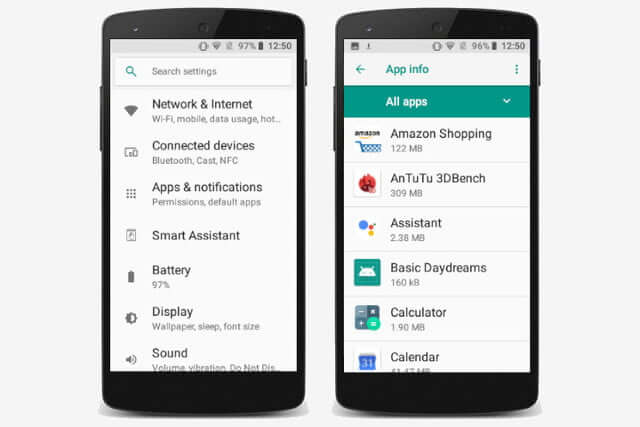
How To Uninstall Apps On Android That Won T Uninstall Droidviews

Frp Bypass Zte Avid Trio Z833 Remove Google Account Verification Google Account Account Verification Smartphone Hacks

Pin On Avid

Unlock Icloud Activation Lock Without Apple Id With Ipsw File On Windows In 2021 Icloud Iphone T Iphone

Frp Bypass Zte Z982 Android 7 1 1 By Most Update Method Try Once Google Settings Settings App Android

Frp Bypass Zte Avid Trio Z833 Remove Google Account Verification Account Verification Google Account Accounting

Facebook Lifestageapp Launched For Videoloving Teenagers Http Gadgets Ndtv Com Apps News Facebook Lifestage App L Iphone Iphone Battery Life Battery Life

How To Close All Running Apps On Zte Blade 10 Disable Running Apps Youtube

How To Uninstall Unwanted Apps In Android Digital Trends
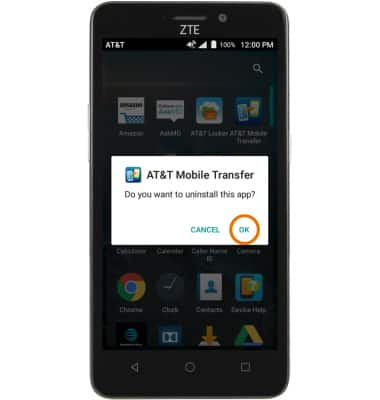
Zte Maven 2 Z831 Remove An App At T
Zte Maven 2 Z831 Remove An App At T

Pin On Blog


Posting Komentar untuk "How To Delete Apps On Zte Phone"