Embed Google Plus Feed On Website
Embedded Instagram feeds showcase your expertise on your website. Start developing with the Maps Embed API by setting up your Google Cloud project.

Easy Embedded Posts By Ganjargal You Can Easily Embed More Than 30 Website Posts Like Facebook Google Plus Youtube Instagram And Soundcloud Embedding Prezi
Select Google Location from the pop-up menu.

Embed google plus feed on website. On the left side of the screen click the name of the calendar you want to embed. Viewed 9k times 3 1. For facebook and twitter iam getting the feeds by referring their developer.
This is a page of my blog which describes how I did it. And theres more than one way to do it. Go to this page replace the feed URL with your own feed use the default color scheme or change it to something else and then click Get Code.
Here are the steps on how to embed a Google reviews widget on your website. Ibacor_gp_streaming ibacor_gp_username google ibacor_gp_key YOUR API KEY. One of the major advantages for publishers to embed Google Plus posts is that any updates to content are appended to the embedded object and readers can interact with the G post directly from your website.
Well it turns out its quite tricky to get Google Reviews on your website in 2019. Sign in with Twitter. Embedding rich content within a post may be able to increase G activity around your content.
Fake reviews have no place among Google Reviews as they ban all anonymous comments and label the most relevant reviews to list them first. Tech a la carte. When you finish copy result HTML code into clipboard.
You can try to extract the HTML directly from the google plus page of the video inspecting the DOM of the page that shows the video. Choose the Embed URL tab. Embed Facebook Feed.
However all is not lost. The two biggest reasons why you would want to embed Google Reviews onto your own. For an index of all the possible parameters for the Maps Embed API request see the Embedding a map guide.
Go to the Sources tab on the left-side menu and then click the Add source button. How To Add In Website. Config the jQuery fancybox plugin.
So here we have mentioned the simple and easy steps using which you can add Google reviews on website. This short guide will walk you through the steps to embed your Google reviews on a Wix website. Go to Embedding a map.
Active 1 year 11 months ago. Benefits of Adding Instagram Feeds The options for embedding Instagram feeds above do vary in difficulty. Id very much like to embed Google reviews in real time on my website.
How To Embed Google Reviews On Website. How to display activity feed of my google plus page in my website. Insert to field and press Create embed code.
Ask Question Asked 7 years 5 months ago. Learn how to embed almost anything in your HTML web pages from Flash videos to Spreadsheets to high resolution photographs to static images from Google Maps and more. All you need is a link from previous step.
Immediate and easy creating of various website widgets by Elfsight. Im hoping I can just copy and paste some code into my website that would display a variety of Google. 3 Ways to add Google Reviews to your website.
However choosing the right one or even the right combination is beneficial for your brand and can strengthen your brand identity. What I want to do in this post is to discuss the options that you have to embed content from G onto your site. First click here to sign up for a free reviews widget and connect your reviews.
In the top right click Settings Settings. You can setup dimmensions and some options about component. In the Integrate calendar section copy the iframe code displayed.
3 Save It Now You Are Done. 2 Now Copy The Below Code And Paste It Between. Go to the picasaweb site.
Plus TwineSocial includes powerful hashtag searching so you can display Google Plus posts by hashtag on your website. Embed your Google Plus feed on your website. Using a WordPress Plugin.
The first way is to install a plugin. You can either display posts from your own Google Plus feed or any other users Google Plus feed. Any Albums that have been set up.
Use an automatic iframe generator to embed a map into your webpage. Set up in Cloud Console. Connect your Google My Business account to the platform.
Taggbox Widget as a social media feed aggregator and UGC platform is one of the best tools to embed Google reviews on the website. Config your Google plus username API key. Next open your Wix website editor and navigate to the page where you want your reviews to display.
I would like to display the activity feeds of my facebook twitter linkedIn google pages in my website. I created tool to basic manage of created code. Embed RSS Feeds in Web Pages.
Use the Embed option on the right Insert panel or disc. You can find more options here. The Google reviews embedding process has been divided into 2 main parts.
Enter or paste your Google Groups URL simply the URL you use to visit the group in a web browser Size the group how you wish it to be displayed and set and options you can give. Believe it or not embedding a Facebook profiles entire feed onto your website is as easy as embedding a single post or video. There are still a few other ways to get those shiny stars on your website.
Becoming an authority in your niche is crucial for gaining more organic traffic. 1 Just Go To Your HTML File. Can you please point me to some documentation that would describe how to create a widget to accomplish this.
Up to 30 cash back Integrate Google Plus Share Button into your website just in 2 steps. 1 Just Change YOUR-GOOGLEPLUS-POST-URL With Your PageProfile Public Post URL Inm Manually Embed Option. Create a DIV element for the Goolge plus feed widget.
I dont understand if it is allowed to post links but ill try. To publish simply embed two lines of code on your site. They used to be relatively easy to embed a few years ago but Google has since phased this solution out.
Google My Business review system is based on a star rating out of 5 plus an option for the reviewer to write a comment.

How To Generate An Rss Feed From Your Google Profile Rss Feed Sentences Homepage

Social Media Feeds And The Tools To Add It On Website Free Social Media Social Media Social Media Strategies
Embed Any Document Plus Wordpress Plugin Wordpress Plugins Plugins Wordpress

Instagram Is Reviewing Its Embedded Posts Feature And It Will Probably Become Necessary To Seek The Permission Of Creators Before Embedding Their Content In Th Instagram Creator Instagram Social Media

Google Trends Graphs In Wordpress Post No Php Or Plugin Google Trends Graphing Technology Hacks
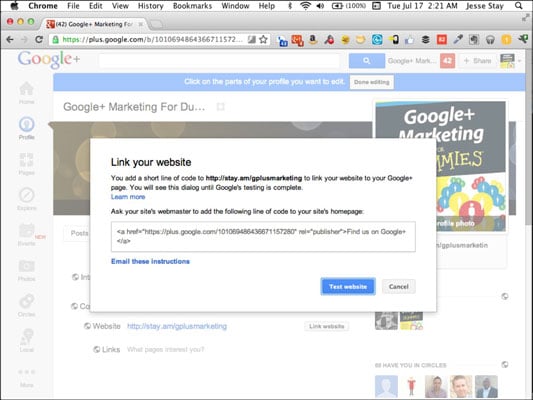
How To Link Your Company S Google Page To Your Website Dummies

An Rss Feed For Your Facebook Page Or Group Online Tools Rss Feed History Bookmarks

Search Social Stream For Wordpress By Saragna Search Social Stream For Wordpress Main Featuresresponsive Layout Social Data Wordpress Wordpress Plugins Design

Facebook Live Video Auto Embed For Wordpress Wordpress Wordpress Plugins Website Facebook Live

How To Embed Google Reviews On Shopify In 2021 Google Reviews Shopify Website Shopify

Social Streams Wordpress Streaming Visual Colorful Backgrounds

Wedgies Love This Polling Tool You Can Share Real Time Results With Two Options Embed Them In A Websi This Or That Questions Social Networks Proper Name

How To Embed Youtube Channel On Your Website Embedsocial
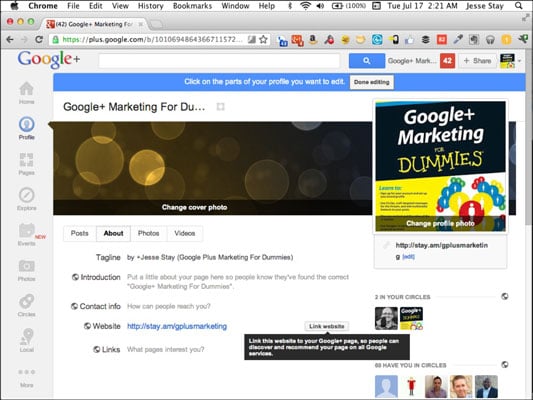
How To Link Your Company S Google Page To Your Website Dummies

Create Full Text Rss Feeds Instantly Full Rss Builder Rss Mashup Creator With A Rest Rss Api

Embedding Instagram Photos On A Google Site Instagram Widget Instagram Instagram Feed

Update On Yesterday S Twitter Outage Twitter Website Down Social Media

Pftq1p20gmuq M

Superio Nulled 1 1 10 Job Board Wordpress Theme In 2021 Job Board Job Portal Job


Posting Komentar untuk "Embed Google Plus Feed On Website"