Computer Not Recognizing Headphones Windows 7
I called Jabra Support and they say this is a Windows problem. Headphones not being detected in Windows 7.

External Drive Not Showing Up Or Recognized 5 Potential Fixes To Try Create Partition External Hard Drive Filing System
Hi Try this out.

Computer not recognizing headphones windows 7. Right-click on the This PC and click on the Manage. There should be only one such symbol depending on where u have connected the headphonesfrontrear If you find headphone symbol repeating at some other place change it to something else. The reason why is because Windows 7 can pretty much self heal if it is on the internet.
Right-click on the volume icon that appears in the system tray. Click on Browse my computer for driver software. If your headphone is working well try this method to solve the Computer Not Recognizing Headphones Issue.
Scroll down and select Realtek HD Audio Manager. A list of options appears from which you will have to click on Playback devices. Also having said all of that some Realtek chipsets and Win7 dont work.
Now I plugged in my speakers and headphones and no sound. To fix audio services open the run command and launch servicesmsc. Windows Audio is a Windows service that manages audio for Windows-based programs.
Aside from hardware issues ie. It must be in configuration somewhere or related to several Windows Updates that occurred on my PC on Oct 2nd 2014. In device manager Windows 7 lists this headset under Other devices.
Open the Device Manager type devmgmtmsc in the Windows search box. Then you should try to roll back the driver. Click Let me pick from a list of drivers on my computer.
Goto Realtek Audio HD manager in systray. Speaker or headphone can be set as default. Goto AudioIO tab and see where is the headphonespeaker symbol.
I installed my regular programs and installed my NVIDIA drivers for my NVIDIA GeForce GT 610 graphics card. Click the folder icon just above and to the right of where it says analog back panel and just below Device Advanced settings. Try reinstalling updating or downgrading the drivers.
Click on Headphones button and open Properties under the Controller Information click on the tab Driver choose Roll Back Driver. Now double click on Communication Headphones. Expand the Sound video game controllers and right click on Realtek High Definition Audio.
It installed everything fine and I restarted. Then plug the headset. I recently formatted my Windows 7 computer because I needed to clear off a load of junk.
Please follow the below steps and check if it helps. Under Devices Windows 7 shows lists this headset by name as an Unspecified device. If at all this service is stopped due to any reason audio devices will not function properly.
Select to Update Driver Software. Im not sure if both can be activated in Window 7 at the same time Control Panel Hardware sounds Sound In Playback tab select Speaker Headphone. Press Windows R type control panel and then hit Enter select Hardware and Sound.
With that being said you may need to delete the drivers and reboot. Then select Device Manager from the right-side menu and find and expand Sound video and game controller from the middle section. Windows 10 not recognizing headphones Fixed 1.
Faulty headset mic or port the most common cause are the audio drivers. With the right mouse button click on Volume button and select Playback devices.

Headphones Don T Work On Pc How To Fix Headphones Not Working On Windows 10 Youtube
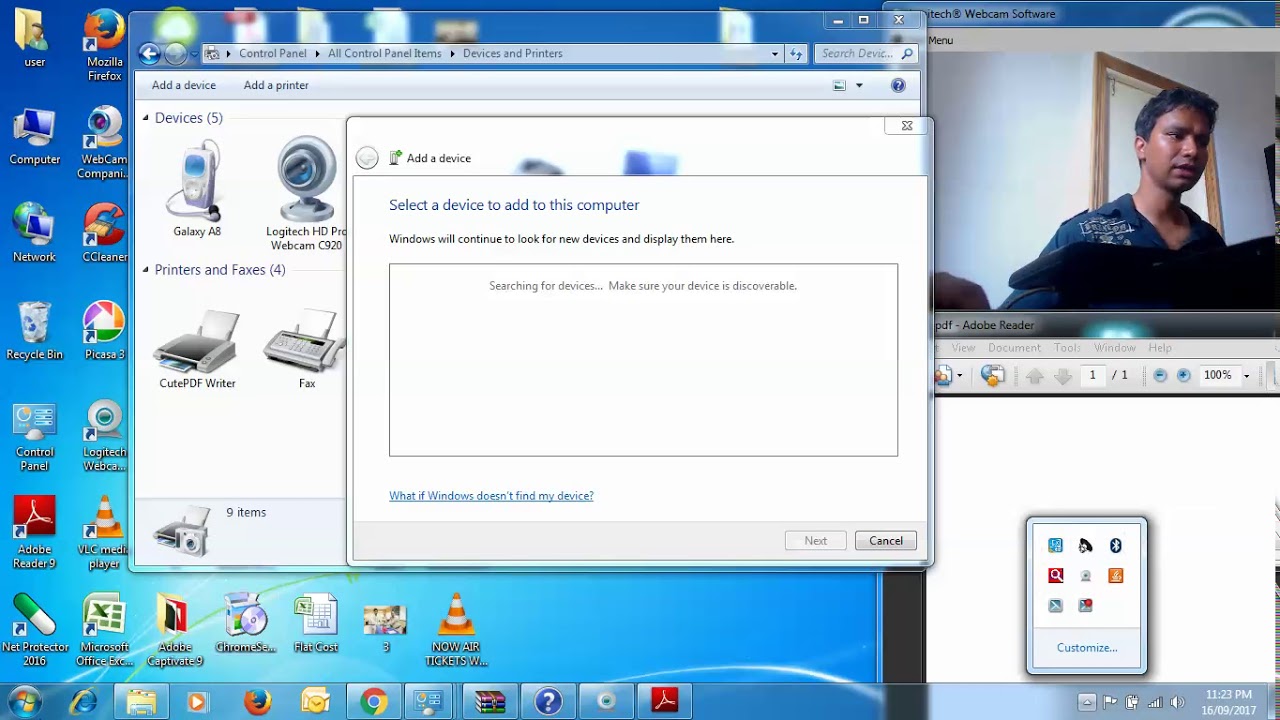
Solved Windows 7 Bluetooth Doesn T Find Devices Youtube

Download Windows 7 Iso Files Full Version Windowstan Computer Basics Used Computers Network Bridges

The 7 Best Headphone Brands 2020 We Recommend Best Headphones Buy Headphones Headphone

Steelseries Arctis 7 2019 Edition Lossless Wireless Gaming Headset With Dts Headphone X V2 0 Surro In 2021 Wireless Gaming Headset Gaming Headset Steelseries

Solved Headphones Not Recognized Not Working On Windows 10 Wired Headphones Headphones Gaming Headset
Logitech G533 Wireless Gaming Headset Dts 7 1 Surround Sound Pro G Audio Drivers In 2021 Wireless Gaming Headset Best Gaming Headset Gaming Headset
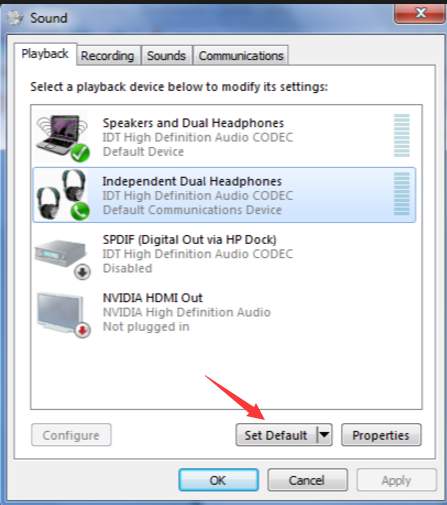
Fix Windows 7 Headphone Not Working Issue Driver Easy
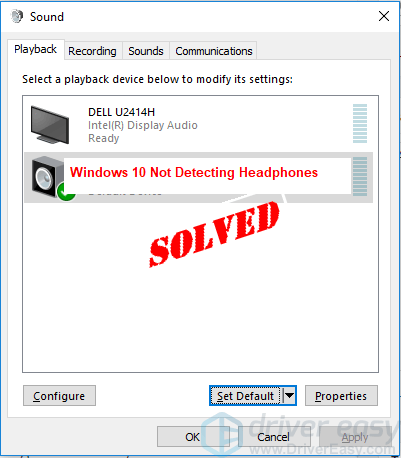
Fix Headphones Not Showing Up In Playback Devices On Windows 10 Driver Easy

10 Pc Wallpaper Setup Download Best 50 Set Up Desktop Background On Hipwallpaper Desktop Hd Wallpapers For Pc Computer Setup Desktop Wallpapers Backgrounds

Your Question How Do I Connect My Headphones To My Computer Windows 7

Enable Bluetooth And Pair Devices In Windows 7 Bluetooth Bluetooth Adapter Wireless Networking

The Best Bluetooth Headphones Noise Cancelling Headset Earbuds Best Bluetooth Headphones

How To Pair Your Bluetooth Headphones With Windows 7 Mee Audio Venture Youtube
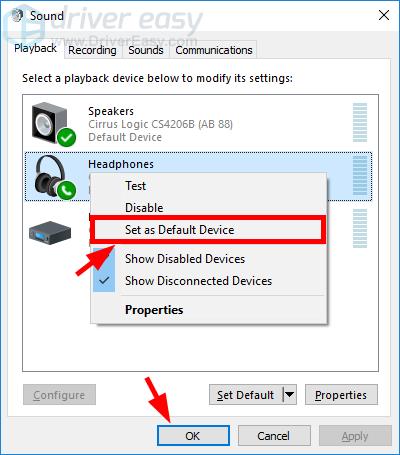
Front Audio Jack Not Working Fixed Driver Easy

No Speaker Or Headphones Are Plugged In Windows 7 8 And 10 Windows 10 Headphone Speaker

Headphones Don T Work On Pc How To Fix Headphones Not Working On Windows 10 Youtube

Ps5 Wireless Gaming Headset In 2021 Wireless Gaming Headset Headphones Gaming Headset

Logitech G533 Wireless Gaming Headset Dts 7 1 Surround Sound Pro G Audio Drivers In 2021 Gaming Headphones Gaming Headset Headset


Posting Komentar untuk "Computer Not Recognizing Headphones Windows 7"